Turn a Webinar Into 30 Days of Social Media Posts: The Definitive Guide
Learn how to turn webinar into social media posts with our 30-day plan. Get actionable strategies for LinkedIn, Twitter, and more to maximize your ROI.

Your webinar was a success. You invested thousands of US Dollars, secured expert speakers, and delivered an hour of pure value. Now what? If your strategy is to email a link to the recording and hope for the best, you’re leaving 90% of its ROI on the table.
Let’s be direct: a single webinar recording isn’t just an asset; it’s a goldmine. The real challenge isn’t creating more content; it's efficiently unlocking the value you already have. This guide provides a strategic, actionable blueprint to turn one webinar into social media posts that fuel your calendar for an entire month, demonstrating clear ROI and saving you dozens of hours of manual work.
Why Social Distribution Is Non-Negotiable for Webinar ROI
Webinars are expensive and time-consuming. The content is valuable, but its reach is inherently limited. The average live attendance rate hovers around 50%, meaning half the people who were interested enough to register never saw your best material. Letting that content gather digital dust is a colossal waste of resources.
The pain is real. Your team is back on the content hamster wheel, brainstorming new ideas from scratch while a perfectly good hour of expert insights sits unused. This isn't just inefficient; it's a strategic failure that costs you leads, authority, and engagement.
Want 30 days of social content from 1 webinar? Start here.
The solution is to systematically deconstruct your webinar into a stream of platform-native social content. This isn’t about spamming a link to the recording. It's about strategically extracting key insights, quotes, and data points and reformatting them for the channels where your audience actually spends their time.
The Business Case for Repurposing
The numbers speak for themselves. A single 60-minute webinar contains enough material for 20-30 unique social media posts. By repurposing, you:
- Maximise Reach: Engage the 50% of registrants who didn’t attend live.
- Extend Lifespan: Keep the conversation and lead generation going for weeks, not days.
- Reinforce Authority: Consistently sharing expert insights cements your status as a thought leader.
- Improve Efficiency: Eliminate the daily pressure to create new content from scratch.
When you turn your webinar into social media posts, you transform a one-off event into a sustained marketing campaign that continuously drives value long after the live session ends.
This cycle shows how a single production effort can be amplified across multiple channels, turning one hour of work into a month of impact.
The Strategic Plan: How to Turn One Webinar Into 30 Days of Content
Right, this is where theory meets action. A single 60-minute webinar can fuel your social media for a full 30 days, but only with a structured plan. You can't just post random clips and hope for engagement. You need a system.
The first step is to mine your webinar transcript for "golden nuggets"—the most potent moments that deliver immediate value. These are the surprising stats, powerful quotes, actionable tips, and relatable stories that made your live audience pay attention. These nuggets are the raw material for your entire social campaign.
A single webinar can be sliced into a diverse mix of assets to keep your feed fresh and engaging. Here’s a realistic breakdown of what one 60-minute session can yield:
- 6-16 Image Quotes: Pull the most memorable one-liners. They are quick to produce, highly shareable, and perfect for reinforcing key takeaways.
- 3-5 Short Video Clips (under 90s): Identify segments that pack a single, powerful punch. These are gold for Reels, Shorts, and LinkedIn video.
- 2-3 In-Depth Carousels: Group related tips or a step-by-step process into a multi-slide carousel, ideal for delivering deeper value on LinkedIn.
From this foundation, you can easily create text-only posts, Twitter threads, and even longer-form content like a webinar to a blog post to capture SEO traffic.
The Manual Grind vs. The Automated Solution
Let's be brutally honest: manually creating 20-30 unique social posts is a soul-crushing amount of work. The traditional workflow is a frustrating mess of different tools and processes:
- Transcribe: Get the webinar transcribed.
- Review: Scrub through the hour-long video to find timestamps for your "golden nuggets."
- Design: Fire up Canva to create each image quote one by one.
- Edit Video: Use a separate video editor to clip YouTube videos or raw files, then add captions.
- Write Copy: Craft unique captions for every single post across all platforms.
This friction is precisely why most webinar repurposing efforts fail. The time, cost, and coordination required to do it properly are more than most marketing teams can handle. It eliminates the need to hire a freelance designer, a video editor, and a copywriter, saving you time and budget. This is where an intelligent, automated approach becomes essential.
Platform-Specific Best Practices: Adapting Content That Wins
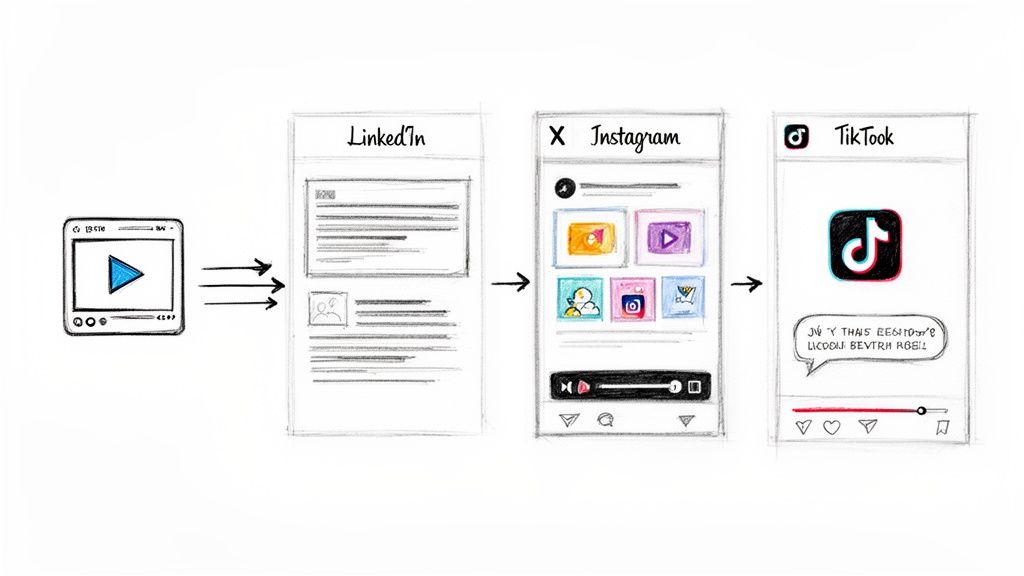
Here’s a hard truth: cross-posting the same content everywhere is a recipe for failure. What ignites a conversation on LinkedIn will be ignored on TikTok. To successfully turn a webinar into social media posts, you must respect the unique culture and format of each platform.
Your goal is not just to be present; it's to be native. This means tailoring your webinar’s "golden nuggets" to fit user expectations on each channel.
LinkedIn: The Professional Value Exchange
LinkedIn is for career growth and industry insights. Your audience wants tangible value, not fluff. Your content must be professional, insightful, and conversational.
- Best Formats: Text-only posts, insightful carousels, and branded image quotes.
- Strategy: Start conversations with data-driven posts. Pull a compelling statistic from your webinar, frame it with a strong hook, and ask your network a question. Use carousels to break down step-by-step processes. Share powerful speaker quotes in professionally branded graphics and tag the speaker to amplify reach.
- Brand Voice: Authoritative, helpful, and professional.
Twitter (X): The Fast-Paced Information Hub
Twitter moves at the speed of light. Content must be concise, punchy, and instantly digestible.
- Best Formats: Threads, single-tweet text posts, and simple image quotes.
- Strategy: Unpack a complex idea from your webinar into a 5-7 tweet thread. Each tweet should build on the last, with the final one linking to the full recording. Use sharp one-liners as high-contrast, shareable image quotes that stand out in a crowded feed.
- Brand Voice: Direct, witty, and concise.
Instagram & TikTok: The Visual Engagement Powerhouses
These platforms are driven by short-form video. Your content must entertain or educate in under 60 seconds. A static, unedited clip from your webinar will not work.
- Best Formats: Short video clips (Reels/TikToks).
- Strategy: Find the most dynamic moments—a surprising stat, a quick "how-to," or a powerful anecdote. Edit them for a vertical screen with large, bold captions and, where appropriate, trending audio. Each clip must provide standalone value, not just act as a trailer for the full webinar. Using a good webinar clip generator can automate this.
- Brand Voice: Energetic, engaging, and visually driven.
The Challenge of Manual Execution
Manually creating 20-30 unique, platform-optimised posts is a monumental task. It requires copywriting, graphic design, and video editing skills, plus dozens of hours. This is the exact friction point where most repurposing strategies die.
RepurposeMyWebinar generates platform-ready social posts with your branding automatically, giving you optimised captions, Twitter threads, and image quotes right out of the gate. It handles the heavy lifting, freeing you to focus on strategy and engagement.
Adapting your content isn't about creating more work. It's about making the work you've already done work smarter.
The Solution: Automating Your Social Content Workflow
We’ve established the strategy. But strategy without execution is just a daydream. The biggest barrier to consistently turning webinars into social posts is the sheer volume of manual labour involved.
Creating 20-30 posts by hand is a chaotic, multi-tool nightmare. You're juggling transcription services, video editors, graphic design software like Canva, and a copywriter. It's a workflow that burns budget on subscriptions and freelancers and drains your team’s time and creativity.
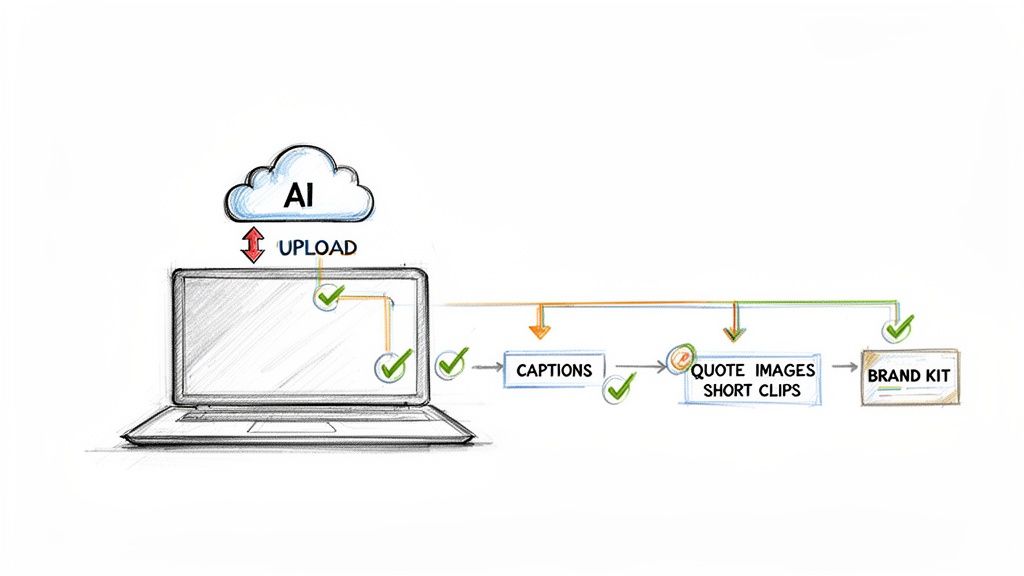
This friction is why automation is no longer a luxury; it’s a necessity for any team serious about ROI.
From Days of Work to Minutes of Review
RepurposeMyWebinar was built to eliminate this manual grind. Instead of a multi-step headache, you get a single, intelligent workflow. Simply upload your webinar recording, and our AI gets to work. Within minutes, it doesn't just transcribe your video; it analyses the content to identify the most potent, share-worthy moments.
This transforms your role from content producer to content curator. You’re no longer bogged down in tedious production tasks. Instead, you're reviewing a suite of professionally crafted assets, ready for deployment.
Our platform generates assets that are optimised for each platform, ready to go live with minimal tweaking:
- Platform-Ready Captions: The AI drafts complete LinkedIn posts, breaks down ideas into Twitter threads, and generates engaging copy, all in a tone that matches your brand.
- On-Brand Image Quotes: Set up your Brand Kit once with your logos, colours, and fonts. The system then automatically applies your branding to every image quote for perfect consistency with zero effort.
- AI-Identified Video Clips: Our AI pinpoints the most compelling soundbites and automatically creates short, shareable video clips, removing the need to manually scrub through an hour-long recording.
This integrated approach solves the three biggest bottlenecks—copywriting, design, and video editing—at once.
Control and Flexibility with a Credit System
We believe you should only pay for what you use. Our flexible credit system puts you in control. Decide exactly how many posts you want to generate from each webinar. Need just a few key assets for a campaign? Generate only those. Need to fill your calendar for a month? Create a full suite of 20-30 posts. This model aligns cost directly with value, making it the most efficient way to turn a webinar into social media posts.
Writing Hooks That Work and Measuring Performance
Having a library of professionally branded assets is a huge win, but it’s only half the battle. If your hooks don't stop the scroll, your content will be ignored. And if you aren’t measuring performance, you can’t prove your efforts are driving business results.
Crafting Hooks That Stop the Scroll
You have less than three seconds to capture attention. Your opening line is everything. It must be sharp, intriguing, and promise immediate value.
Here are three proven formulas based on your webinar’s "golden nuggets":
- The Statistic Hook: "Most B2B marketers miss the one tactic that boosts webinar ROI by 45%."
- The Question Hook: "Are you letting your most valuable content gather digital dust?"
- The Story Hook: "Our guest speaker almost made a career-ending mistake. Here's the insight that saved them."
Your hook’s only job is to earn another three seconds of attention. Create curiosity. RepurposeMyWebinar includes AI-drafted captions with strong hooks, which you can use as-is or quickly refine to match your voice.
Measuring What Matters: Proving ROI
Don't get lost in vanity metrics. Focus on the data that ties back to your business goals.
- LinkedIn: Track Engagement Rate and Comments. High comment volume indicates you’re sparking valuable conversations.
- Twitter (X): Monitor Shares (Retweets) and Profile Clicks. These show your content is compelling enough for others to endorse.
- Instagram/TikTok: Focus on Shares and Saves. These are powerful signals that your content provides so much value people want to revisit it.
Ultimately, the goal is business impact. Average webinar conversion rates on gudsho.com are incredibly high for B2B. Track click-throughs to the full recording and monitor new leads generated from your social posts to connect your repurposing efforts directly to revenue.
Your Next Step: From Overwhelmed to Automated
You now have a complete blueprint to transform a single webinar into a month-long social media campaign. You know how to find your best content, adapt it for each platform, write compelling hooks, and measure what matters.
You are at a fork in the road.
Path 1: The Manual Grind. Continue juggling multiple tools, freelancers, and endless hours of tedious work. This is the path where good intentions die.
Path 2: The Automated System. Let intelligent technology handle 80% of the production work, freeing your team to focus on strategy, engagement, and driving results.
This isn't about working harder; it's about making your existing assets work harder for you. The difference between a forgotten recording and a month of high-impact content is having the right system.
That system is RepurposeMyWebinar. We built it to eliminate the manual work, the multiple tools, and the need to hire specialists. Just upload your webinar, and our platform automatically generates a complete set of on-brand, platform-ready social posts in minutes.
Ready to see it in action?
Upload your webinar free and get your first batch of social posts today
Frequently Asked Questions
Getting started with webinar repurposing can bring up a few questions. Here are the most common ones we hear.
How many social posts can I actually get from one webinar?
From a typical 60-minute webinar, you can easily generate 20-30 unique social media posts without being repetitive. This includes a strategic mix of 3-5 short video clips, 6-10 image quotes, 2-3 detailed LinkedIn carousels, and several text-only posts or Twitter threads. The key is to extract individual ideas, not just summarise the session. An automated tool finds these moments and creates the assets in minutes.
What's the best way to maintain brand voice and consistency?
Brand consistency is non-negotiable. The solution is a Brand Kit—a central file containing your official logos, brand colour codes, and fonts. Apply these elements to every asset you create. We built this feature directly into RepurposeMyWebinar. You upload your Brand Kit once, and the platform automatically applies your branding to every post it generates, ensuring a professional, consistent look every time.
How do I determine the optimal posting frequency and timing?
Optimal frequency depends on the platform. For LinkedIn, 2-3 high-value posts per week is effective. For Twitter, 1-3 posts per day can work well. For Instagram/TikTok, aim for 3-5 times per week. The best timing is when your specific audience is most active—check your platform analytics for this data. The goal is consistent value, not overwhelming volume. A steady drumbeat of repurposed content keeps your brand top-of-mind.
Ready to eliminate the manual grind and turn your webinars into a reliable content engine? RepurposeMyWebinar transforms your recordings into a month's worth of on-brand social posts in minutes.
Upload your webinar for free and see your first batch of social posts today


