How to Automate Webinar Repurposing and Guarantee Your ROI
Discover how to automate webinar repurposing to save time, reduce costs, and turn one webinar into a month of high-impact content for your B2B marketing.

Your webinars are content goldmines, but they're also a huge investment. You pour time, US Dollars, and expertise into creating them, only for the recording to be dumped in a cloud folder and gather digital dust. It's a massive missed opportunity that costs you leads and ROI.
This happens when you're stuck doing things the old way. Manual repurposing is the friction that stops you from getting real value out of your best content. It's slow, expensive, and requires juggling multiple tools and freelancers. There's a better way.
Why Manual Webinar Repurposing Is Costing You Growth
Let's be direct: the traditional process is a nightmare. It’s a bottleneck that actively holds back your growth and wastes your budget.
You're stuck juggling a dozen different tools for transcription, video editing, graphic design, and social scheduling. You might spend an entire afternoon just scrubbing through a recording to find a few shareable clips. Then you brief a designer, wait for the assets, and start the painful back-and-forth revision process. All while your expensive webinar recording sits unused.
This disjointed workflow isn't just inefficient; it's costing you leads.
The True Cost of a Manual Workflow
Manual repurposing is a silent killer of your marketing budget and team morale. The hidden costs add up fast:
- Wasted Team Hours: Your marketing team is burning valuable time on tedious tasks—transcribing, cutting video, making graphics—instead of focusing on high-impact strategy.
- Inconsistent Branding: Without a central system, keeping brand consistency across dozens of assets is a losing battle. The result is a diluted brand presence that feels messy and unprofessional.
- Lost Opportunities: While your team struggles to squeeze out a handful of assets, your competitors using automation are already publishing dozens. They're capturing attention and generating leads while you're still stuck in editing software.
This manual drag makes it impossible to scale. Instead of turning one 60-minute webinar into 30 days of content, you’re lucky to get a couple of social posts after a week of grind. That's not a sustainable model for growth.
The reality is that manual repurposing makes it impossible to extract the full value from your webinar investment. It’s a reactive, time-consuming cycle that guarantees your best content will remain underutilised.
The table below breaks down the stark difference. The old way isn't just slow; it's incredibly expensive in both time and opportunity cost.
The True Cost of Manual vs Automated Repurposing
| Metric | Manual Repurposing (Per Webinar) | Automated Repurposing (With RepurposeMyWebinar) |
|---|---|---|
| Time to First Asset | 3-5 business days | 5-10 minutes |
| Total Team Hours | 15-20 hours | < 1 hour (for review & scheduling) |
| Estimated Labour Cost | US$525 - US$700 (at US$35/hr) | Included in platform subscription |
| Number of Assets Created | 5-8 (1 blog, 4-7 social clips/images) | 30+ (1 blog, 10+ clips, social posts, audiograms, etc.) |
| Content Lifespan | ~1 week | 30+ days |
| Required Tools | 4-5 (Transcription, Video Editor, Design, Scheduler) | 1 (All-in-one platform) |
Simply put, automation with RepurposeMyWebinar allows you to produce 4-5 times more content in a fraction of the time, for a fraction of the cost. The ROI isn't just about saving money on freelancers; it's about the massive increase in output and the leads that content generates long-term.
Shifting from Manual Labour to Automated Strategy
Moving to an automated process is a strategic decision to maximise ROI. B2B webinars are a powerhouse for lead generation. But without a smart repurposing strategy, that goldmine of insights just sits there after the live event. To see the data behind these figures, you can learn more about webinar marketing benchmarks.
Imagine this instead: you upload your webinar recording to RepurposeMyWebinar. Within minutes, it generates a complete campaign of ready-to-use LinkedIn posts, blog articles, short clips, and even translations. Everything is automatically branded with your company's logos and fonts.
This isn't about saving a few hours. It’s about transforming a single, high-effort event into a continuous content engine that drives leads for weeks. By eliminating the manual work, the juggling of multiple tools, and the need for extra hires, you finally unlock the speed and scale required to dominate your market.
Designing Your Automated Content Production Line
An automated workflow is the heart of a smart plan to automate webinar repurposing. This isn't about shaving off a few minutes. It's about designing a repeatable production line that turns one webinar recording into a full month of high-quality, professional content.
Stop thinking about one-off tasks and start designing a system.
The process kicks off the second your webinar ends. Instead of letting that recording from Zoom or Teams gather dust, you drop it into RepurposeMyWebinar. That’s your only manual step. From there, AI does the heavy lifting that used to eat up days of your team's time.
The AI instantly transcribes the entire recording and analyses the conversation to pinpoint the gold—the key stats, killer quotes, and actionable advice that will resonate with your audience.
From Raw Recording to Branded Assets in Minutes
With key moments identified, the platform generates a full suite of professional assets. Forget briefing designers or juggling five different software tools. You can instantly create an entire content campaign, tailored for every channel.
In practice, this means turning one webinar into:
- 10-15 short-form video clips, perfectly formatted with slick, animated captions for social media.
- 6-16 image quotes pulling out powerful speaker soundbites, ready to publish on LinkedIn and Instagram.
- An SEO-optimised blog post drafted from the full transcript, structured with proper headings and key takeaways.
- A series of engaging audiograms for platforms where your audience prefers to listen.
Every single asset is automatically stamped with your Brand Kit. Your logos, brand colours, and specific fonts are applied across the board, guaranteeing a professional, cohesive look without anyone touching a design file. This completely eliminates the painful back-and-forth with designers and ensures your brand looks sharp, every single time.
The goal is to build a system where one video file becomes the raw material for an entire month's content calendar. This shift takes your content strategy from a reactive, labour-intensive slog to a proactive, efficient engine that consistently delivers value.
This diagram shows the night-and-day difference between a clunky manual process and a sleek, automated one.
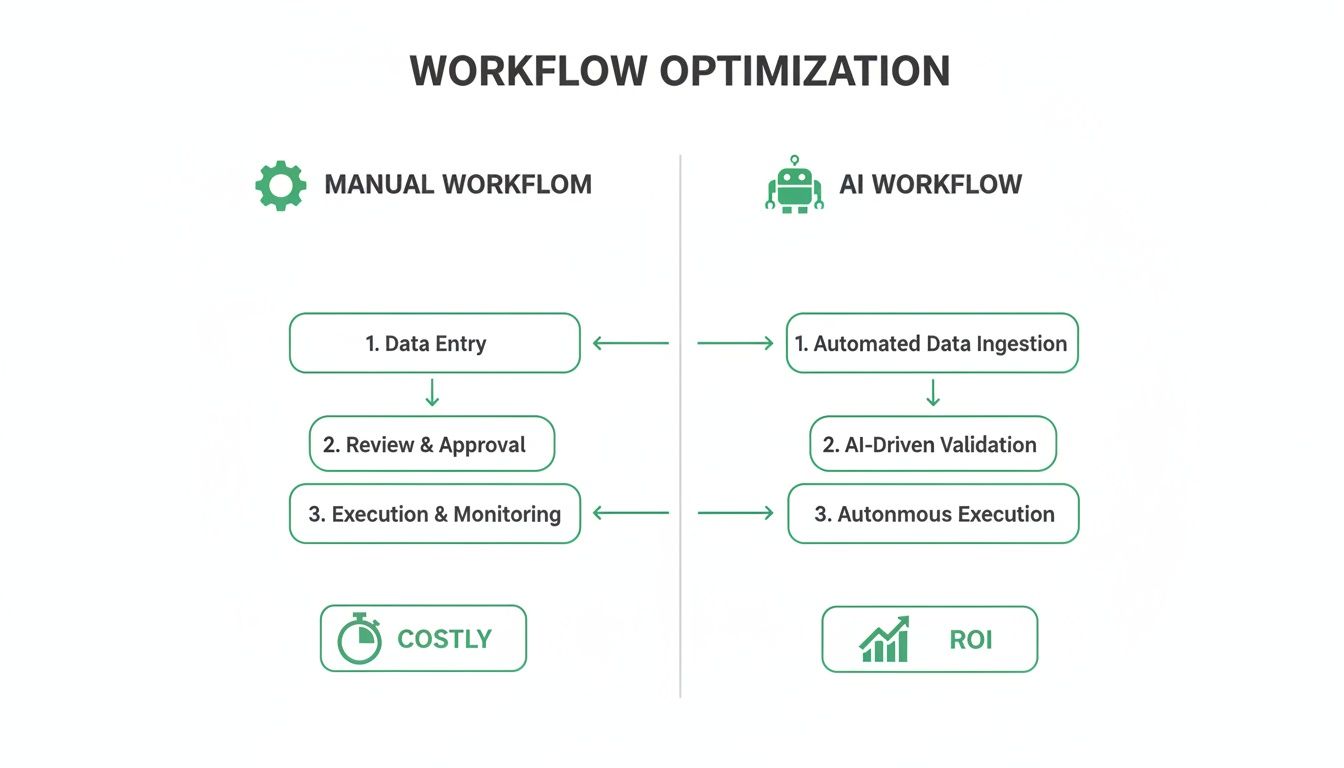
As you can see, the AI workflow slashes the number of manual touchpoints, turning expensive, time-sucking steps into immediate, ROI-generating content.
Streamlining Review and Final Publication
Once the assets are created, the final stretch is all about speed and collaboration. No more emailing files for approval. Your team can review everything in one place, add comments, or approve assets with a click.
This centralised review process smashes the bottlenecks that usually grind content publication to a halt.
The last piece of the puzzle is scheduling. RepurposeMyWebinar plugs right into your social media schedulers and CMS. You can push approved content directly into your publishing queues, filling up your calendar without ever manually downloading and re-uploading a single file.
This complete, end-to-end system gives you a repeatable, scalable process. It's how you turn a 60-minute webinar into 30 days of content, not as a rare, heroic effort, but as a standard part of your marketing operation.
Generating High-Impact Content on Autopilot
Let's get practical. When you automate webinar repurposing, you're not just creating a few extra social posts. You're building a rich, diverse content calendar that hits different audiences on their favourite platforms—all from a single recording.
A one-hour conversation is transformed into a full library of publish-ready, professionally branded assets, optimised for every channel. It’s about turning one big effort into dozens of continuous opportunities to connect with your audience and generate leads.
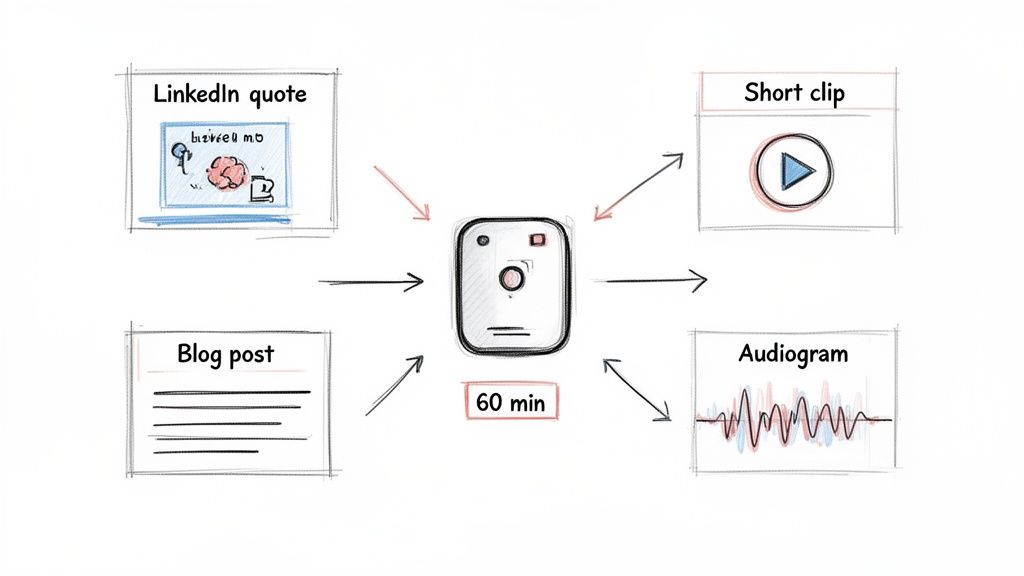
From One Hour to One Month of Content
Imagine your next 60-minute webinar ends. Instead of facing a week-long manual slog, RepurposeMyWebinar gets to work instantly. Within minutes, you have a complete suite of professional assets ready for review.
Here’s a realistic look at what that output looks like:
- 10-15 Branded Image Quotes: AI pinpoints the most powerful soundbites and turns them into sharp, professional graphics with your logo and brand colours applied automatically. Perfect for LinkedIn and Twitter.
- 6-8 Short-Form Video Clips: These are compelling, 30-90 second clips with animated, burned-in captions, already optimised for TikTok, Reels, and YouTube Shorts. You can dive deeper into creating these in our guide on using a webinar clip generator.
- 1 SEO-Friendly Blog Article: The full transcript is intelligently restructured into a proper blog post, complete with H2/H3 headings and key takeaways, ready to drive organic traffic.
- Multiple Engaging Audiograms: For the audience that prefers to listen, the system creates audiograms with dynamic waveforms and branding, ideal for sharing on social media.
- 5-7 Professional LinkedIn Posts: The platform even drafts concise, insightful posts that summarise the webinar's core ideas, all set for you to schedule.
This isn't about creating more work. It’s about creating professional, publish-ready content that completely eliminates the need for manual editing, multiple tools, or freelance help.
Your 60-minute webinar is no longer a one-off event. It becomes the foundation for 30 days of consistent, high-quality marketing. This is how you achieve the scale needed to stay top-of-mind without burning out your team.
Meeting Your Audience Where They Are
This multi-format approach is essential because it lets you reach your entire audience. Some prospects want to read an in-depth blog post, while others only have 60 seconds for a Reel. By generating content for every platform, you ensure your key messages actually land, no matter how people consume information.
Considering webinars deliver a huge ROI, turning them into a multi-channel campaign with a mix of assets is no longer just a nice idea—it's a core growth strategy.
Building a Varied and Effective Content Calendar
With this automated arsenal of content, populating your calendar for a full month becomes effortless. Gone are the days of scrambling for post ideas.
Here's a sample schedule you could build from just one webinar.
A Sample 30-Day Content Calendar from One Webinar
This simple template illustrates how you can map out a full month of varied content, getting maximum mileage from a single 60-minute recording.
| Week | Monday (LinkedIn) | Wednesday (Blog/SEO) | Friday (Instagram/Reels) |
|---|---|---|---|
| Week 1 | Image Quote (Key Statistic) | Publish the Full Blog Post | Video Clip 1 (Actionable Tip) |
| Week 2 | Video Clip 2 (Expert Insight) | Share an Audiogram Highlight | Image Quote (Provocative Question) |
| Week 3 | LinkedIn Text Post Summary | Video Clip 3 (Quick Demo) | Image Quote (Bold Statement) |
| Week 4 | Video Clip 4 (Audience Q&A) | Re-promote the Blog Post | Video Clip 5 (Key Recap) |
And remember, this is just a small sample. With dozens of assets ready to go, you can maintain a high-quality, consistent presence across all your key channels, driving engagement long after the live event has finished. An automated system makes this level of output not just possible, but easy.
Weaving Automation into Your Marketing Tech Stack
True automation isn't about another tool to manage. It's about building a frictionless system where your best content flows effortlessly into the platforms you already use. The goal is a hands-off content pipeline that ends the soul-crushing cycle of manual downloads and uploads.
This saves a staggering amount of time, but more importantly, it ensures your valuable content actually sees the light of day.
A platform to automate webinar repurposing should be the central hub connecting content creation to distribution. No more chasing files or wrestling with formats. Everything just works.
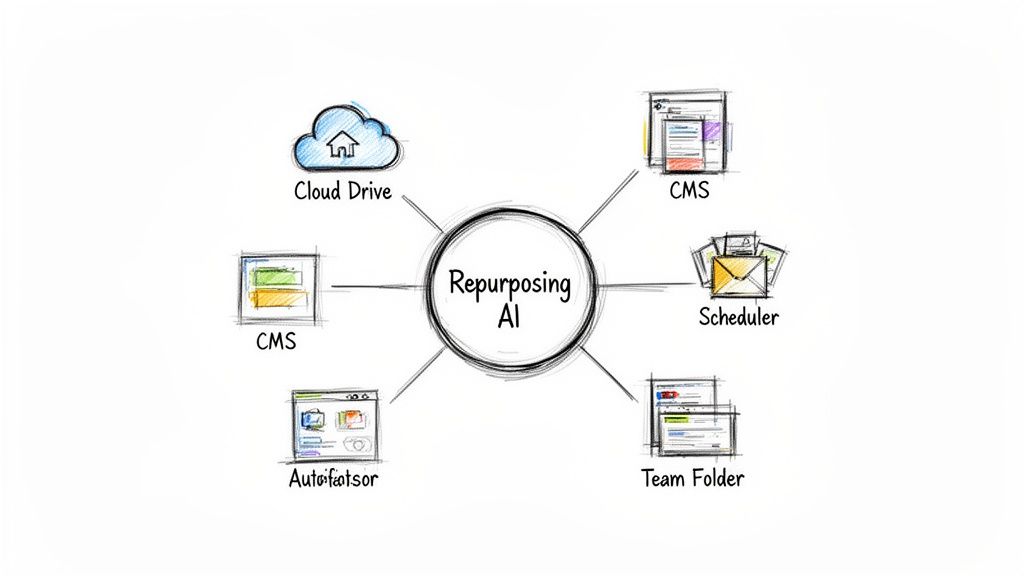
Creating Hands-Off Content Workflows
Imagine finishing a webinar and, within minutes, every asset is already where it needs to be. That’s what a fully integrated system delivers. Instead of a clunky headache, you create simple "recipes" that run on autopilot.
Think about these real-world scenarios that remove the manual grind:
- Sync to Shared Drives: All your video clips, quote images, and blog drafts get pushed automatically into a specific folder in Google Drive or Dropbox. Your team gets instant access without you lifting a finger.
- Push to Social Schedulers: Approved social media clips and posts are sent straight into your scheduling tools like Buffer, Hootsuite, or Sprout Social. Your content calendar fills itself.
- Feed Your CMS: The full, SEO-optimised blog post lands directly in your HubSpot or WordPress drafts, perfectly formatted and waiting for a final polish.
These connections transform your workflow into a smooth, automated production line. The time saved is huge, but the real ROI comes from the consistency and speed you can now deploy high-quality content.
The core idea is simple: your content should move from creation to publication without manual friction. Integrating your repurposing platform with your existing tech stack is what makes this a reality.
Building Your Integrated Ecosystem
Setting this up is simpler than you think. RepurposeMyWebinar is built to connect with the tools B2B marketing teams already use. It acts as a central command centre for your webinar content, which means you can stop juggling different subscriptions for transcription, video editing, and graphic design.
You can check out a full comparison of the best webinar repurposing tools to see how much an all-in-one solution simplifies things.
Your goal is to establish a 'set it and forget it' system. Once connected, the platform does the heavy lifting, ensuring every asset is delivered to the right place, in the right format, every time. This frees up your team to focus on strategy and engagement instead of mind-numbing admin work. It’s the secret to scaling your content output without scaling your headcount or stress levels.
Measuring the ROI of Your Automated Content Engine
Ultimately, you need to prove the ROI. Moving to an automated webinar repurposing system is a strategic move that delivers a clear, measurable return. This means looking past vanity metrics and focusing on the KPIs that matter to your budget and business goals.
The good news? The ROI is incredibly easy to track. When you swap a fragmented, manual process for a single automated platform, the jump in efficiency and output is immediate and dramatic. You can finally put hard numbers on the time you're saving and the leads you're generating.
Calculating Your Time and Cost Savings
The most direct way to prove value is by calculating the hours your team gets back. Manually chopping up a single 60-minute webinar can easily consume 15-20 hours of your team's time. At an average hourly rate, that's a serious labour cost sunk into just one event.
With RepurposeMyWebinar, that entire workload shrinks to less than an hour for final review and scheduling. You can work out your return with a simple formula:
(Hours Saved per Webinar x Team's Hourly Rate) - Platform Cost = Net Savings
Let's say you save 15 hours on a single webinar, and a team member's time is valued at US$40/hour. You’ve just saved US$600 on that one event. Run two webinars a month, and that's US$1,200 in saved labour costs, which more than justifies the investment in automation.
The goal isn't just saving time; it's reallocating that time to smarter work. Instead of trimming clips, your team can focus on analysing performance, engaging with your audience, and planning what's next.
Another powerful metric is your Cost Per Asset. Before automation, if it takes 20 hours to produce eight assets, your cost per asset is high. Once you automate, you're generating 30+ assets in under an hour. This crushes your cost per asset, showing a massive efficiency gain and letting you produce far more content on the same budget.
Tracking Content Performance and Lead Generation
While saving money is a huge win, the ultimate goal is to drive business. An automated content engine lets you track the performance of every repurposed asset, drawing a straight line from your efforts to engagement and leads.
Start tracking these key performance indicators:
- Engagement Rate: Are people liking, commenting, and sharing your video clips and quote graphics?
- Reach and Impressions: How many unique people are seeing your content? An automated system makes consistent posting easy, which naturally boosts reach.
- Click-Through Rate (CTR): How many people click the links in your social posts or blog articles that point back to the full webinar or a landing page?
- Lead Generation: By using unique tracking links, you can see exactly how many new leads come from your repurposed content. Research shows that 73% of B2B webinar attendees become qualified leads; repurposing gives you more shots at capturing them.
By tracking these numbers, you build a crystal-clear picture of your ROI. For more ideas, read our guide on how to maximise your webinar ROI. This data gives you the undeniable proof needed to justify your investment and prove its direct impact on the bottom line.
How to Automate Webinar Repurposing Today
You've seen how to stop your webinars from gathering digital dust and start turning them into a powerful, consistent source of content. Gone are the days of manual edits, designing social posts from scratch, and juggling a chaotic publishing schedule.
Instead of hiring more people or patching together a dozen different tools, you can put a single, AI-powered system in place to do all the heavy lifting for you.
The path forward is clear: stop letting your valuable webinar recordings go to waste. Start turning every 60-minute session into 30 days of high-quality, on-brand content that drives engagement and shows a real return on investment. It's time to work smarter, not harder.
Your Immediate Next Steps
Your webinars are a significant investment, often costing thousands of US dollars to produce. Letting them sit on a server is literally leaving money on the table. With RepurposeMyWebinar, you can finally unlock that hidden value, turning one high-effort event into a steady stream of marketing assets that generate leads for weeks.
The real cost of manual repurposing isn't just the hours you lose; it's the missed opportunity to dominate your niche with consistent, expert content. Automation flips this, making high-volume, professional output the new standard.
Choosing to automate is about adopting a smarter workflow. RepurposeMyWebinar eliminates the need for separate video editors, designers, and transcription services by rolling everything into one efficient platform.
The process couldn't be simpler: upload your recording, and let the AI handle the rest.
Ready to see how fast you can turn your last webinar into your next month of content? The speed and simplicity will speak for themselves. The best way to understand the impact is to experience it yourself.
Take the first step towards a more efficient and impactful content strategy. Try RepurposeMyWebinar for free today and see your first batch of professional, on-brand assets in minutes.
Your Questions, Answered
Got a question about automating your webinar repurposing? We've heard them all. Here are the answers to the most common queries B2B marketers have.
How Much Content Can I Really Get From One Webinar?
A single 60-minute webinar is a goldmine. With a solid automation platform, you’re realistically looking at over 30 unique assets—enough to fill an entire content calendar.
Think of it as a complete campaign from one event:
- 10-15 short-form video clips for socials.
- 6-16 branded image quotes with key speaker insights.
- 1 full, SEO-optimised blog post from the transcript.
- Multiple audiograms for your podcast feed or social sharing.
- 5-7 professionally drafted LinkedIn posts.
The whole point is to turn one high-effort webinar into 30 days of consistent, high-quality content without the manual grind.
How Long Does It Actually Take to Automate This?
This is where the ROI hits home. The manual way of repurposing a webinar can easily eat up 15-20 hours of your team’s time. You’re bouncing between tools to transcribe, edit video, design graphics, write copy, and schedule everything.
With an automated platform, that entire process shrinks to under 10 minutes of your time. You just upload the recording. The AI takes care of the transcription, finds the best clips, and builds the assets. Your team’s role is reduced to a quick final check and hitting 'schedule'.
What if My Webinars Have Multiple Speakers?
No problem. Platforms like RepurposeMyWebinar excel with multi-speaker events. The AI transcription is smart enough to identify and label each speaker, which makes pulling quotes or creating clips attributed to the right person incredibly simple.
This is a huge leap from doing it by hand, where telling voices apart is a headache. The system does the heavy lifting, separating the dialogue automatically.
How Does the Cost Compare to Doing It Manually?
If you were to pay for the labour alone, manually repurposing a single webinar could easily cost over US$500, especially when you factor in team time or freelancer fees. That’s before adding up the monthly subscriptions for all your separate video editing, design, and transcription tools.
An automated platform consolidates all of that into one subscription. The plans are built to be far more cost-effective, slashing your cost-per-asset and letting you ditch a handful of other software subscriptions.
Ready to stop letting your best content collect dust? RepurposeMyWebinar turns your recordings into a month of professional, on-brand assets in minutes.