Maximise Webinar ROI: The No-Nonsense Playbook to Turn One Hour into 30 Days of Content
Learn how to maximize webinar ROI with a proven playbook that turns recordings into a content engine and offers practical tips on promotion and repurposing.
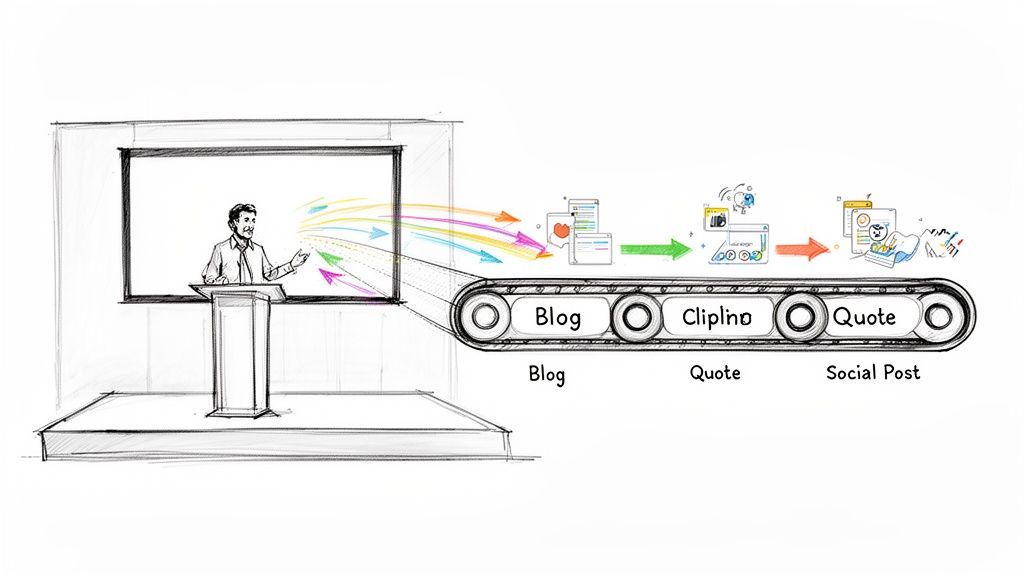
Maximising your webinar ROI is all about what you do after the live event finishes. The secret is to stop thinking of it as a single performance and start seeing it as a content engine. Your goal should be to systematically slice up that recording into dozens of smaller assets—think video clips, blog posts, and social media quotes—to keep generating leads and engagement for weeks, or even months, without the manual grind.
Stop Treating Webinars as One-Off Events
Let's be direct: webinars are expensive. You pour a significant budget, countless hours, and deep expertise into creating one high-value live session. So why do so many marketing teams let all that value evaporate the moment the broadcast ends?
Too often, the recording—a goldmine of expert insights, snappy quotes, and genuine customer questions—gets buried in an archive, its potential completely wasted.
This "one-and-done" approach is a huge misstep. It treats a valuable asset like a disposable performance, completely ignoring the fact that up to 40% of total webinar views happen on-demand. When you pack up after the live show, you’re walking away from a massive amount of engagement and potential revenue.
The Shift from Performance to Raw Material
To really squeeze every drop of value from your webinars, you need a mindset shift. Stop seeing your webinar as a finished product. Instead, look at it as the raw material for a whole month's worth of high-performing content.
A single 60-minute recording contains everything you need to fuel your entire content calendar.
Imagine turning that one-hour session into:
- An SEO-optimised blog post that pulls in long-tail search traffic.
- 5-10 short video clips, perfect for LinkedIn, TikTok, and Instagram Reels.
- 6-16 impactful image quotes for your visually driven social feeds.
- A series of LinkedIn text posts breaking down the key takeaways.
This isn’t about working harder; it’s about working smarter. The real barrier for most teams is the sheer pain of manual repurposing. The endless hours scrubbing through footage, juggling expensive tools for editing and design, or hiring costly freelancers—it’s slow, inefficient, and drains your resources. This is where RepurposeMyWebinar steps in, eliminating the manual work, multiple tools, and hiring needs with one simple, automated platform.
The real return on your webinar investment isn't generated during the live 60 minutes. It's unlocked in the 30 days that follow by systematically deploying repurposed assets across every marketing channel you own.
Adopting a Three-Phase Framework
To make this happen, you need a systematic, three-phase framework that covers every stage of your webinar's lifecycle: before, during, and after the event. The playbook below is designed to turn your webinars from expensive, single-use assets into a sustainable content and revenue engine.
We'll walk through each phase in this guide, but here's the key takeaway: your single most important post-webinar activity is a fast, efficient repurposing strategy.
Let's look at the big picture with a simple framework.
The Three-Phase Webinar ROI Maximisation Framework
This table breaks down how to approach your webinar strategy from start to finish, ensuring no opportunity is missed. It organises the entire process into manageable stages, each with a clear objective.
| Phase | Primary Objective | Key Activities |
|---|---|---|
| Phase 1: Pre-Webinar | Maximise Registration & Attendance | Define goals & KPIs, target ideal audience, create compelling promotional assets, run multi-channel campaigns. |
| Phase 2: During Webinar | Drive Engagement & Conversion | Deliver high-value content, use interactive tools (polls, Q&A), present a clear call-to-action (CTA). |
| Phase 3: Post-Webinar | Extend Reach & Maximise ROI | Send follow-up sequences, measure attribution, systematically repurpose the recording into micro-content. |
The "after" is where the real magic happens. By using a platform like RepurposeMyWebinar, you can completely eliminate the manual grind. No more juggling multiple tools or hiring extra help. Just a simple, automated workflow that turns your recording into 30 days of content in minutes, not weeks. This is the foundation for a measurable and scalable webinar programme that actually delivers.
Your Pre-Webinar Blueprint for a Full House
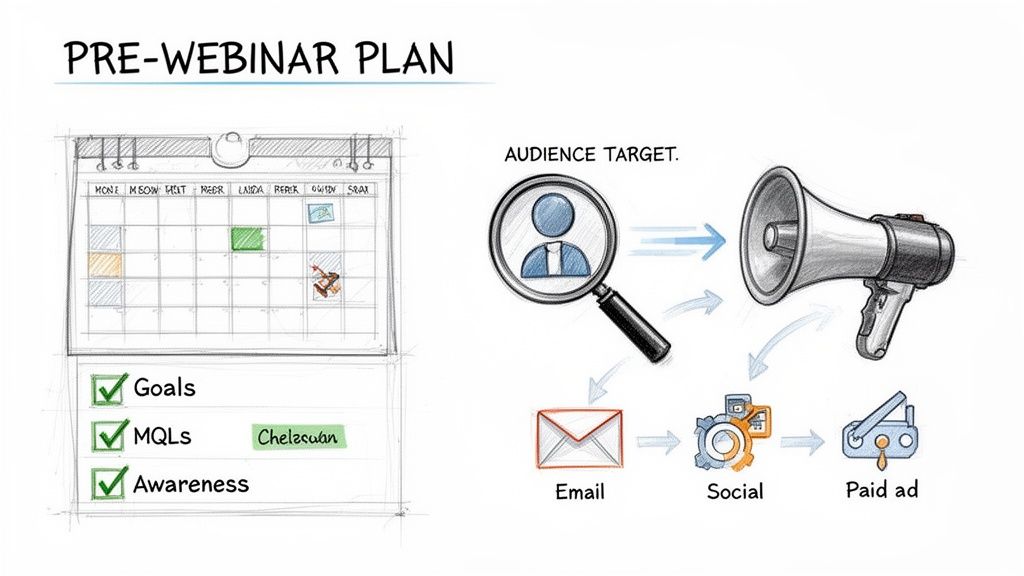
A webinar that smashes its targets doesn't just happen the moment you click "Go Live." The real work starts weeks before with a killer pre-launch plan. Skipping this part is like building a theatre but forgetting to sell any tickets—you’ll be talking to an empty room.
The goal here is to build unstoppable momentum. We're not just sending a few announcement emails; we're orchestrating a multi-channel campaign to attract the right people and make sure they actually show up.
Nail Down Your Single Most Important Goal
Before you write a single word of copy, you need to get brutally honest about what success looks like. Ambiguity is the enemy. What is the one primary thing you need this webinar to achieve? Without a clear goal, you have no way to measure success or maximise your webinar ROI.
This one decision will steer everything else, from the content you create to the audience you chase. So, get specific.
- Lead Generation: Are you aiming for a set number of Marketing Qualified Leads (MQLs)? Think: "Generate 200 MQLs with a budget under US $5,000."
- Customer Retention: Is the focus on reducing churn? An example would be, "Decrease customer churn by 5% this quarter by showcasing advanced product features."
- Brand Awareness: Need to make a splash in a new market? A goal might be, "Get 500 live attendees from our target enterprise accounts in the fintech sector."
Clarity at this stage turns your webinar from a vague marketing task into a precision tool for hitting business targets.
Target Your Audience with Laser Precision
With your goal locked in, it's time to figure out exactly who needs to be in that virtual room. A wide, generic net only catches low-quality registrants who are far less likely to attend, engage, or ever become customers. You need to focus your efforts squarely on your Ideal Customer Profile (ICP).
This means going deeper than just basic demographics. What are their professional pain points? Where do they hang out online? Which influencers do they follow on LinkedIn? What specific problem are they desperate to solve right now?
A webinar for everyone is a webinar for no one. Speaking directly to the acute pain points of a niche audience will always outperform a generic message aimed at the masses. It's the difference between a standing ovation and polite applause.
Answering these questions allows you to tailor your messaging and pick promotional channels that put your webinar right in front of the people who will get the most value from it—and, ultimately, buy from you.
Build an Unmissable Promotion Engine
Okay, you have your goal and your audience. Now it's time to build the hype. A scattergun approach won't cut it. You need a coordinated, multi-channel promotion strategy that makes your webinar feel like it’s everywhere your ideal attendee looks.
The Email Nurture Sequence
This is your workhorse. Don't just send one "Register Now" blast and hope for the best. Craft a three-to-four-part sequence that builds anticipation.
- The Big Problem: Announce the webinar by zeroing in on the core pain point it solves.
- The Expert Insight: Introduce your speaker. Share a compelling quote or a surprising statistic from their presentation.
- The Social Proof: Include a customer testimonial or a quick poll result showing others are struggling with the same challenge.
- The Final Call: Create some urgency with a classic "last chance to register" reminder 24 hours before you go live.
The Organic Social Media Campaign
Your social channels should be buzzing. Create bite-sized assets that tease your webinar's core message. Turn a key speaker quote into a branded graphic for LinkedIn. Film a quick 30-second video with the host explaining the top three takeaways.
This pre-event content doesn't just drive registrations; it also gives you a fantastic head start on your post-webinar content. For a deeper dive on this, check out our guide on powerful content distribution strategies.
Targeted Paid Advertising
Use LinkedIn or Facebook ads to reach your ICP with surgical precision. You can target by job title, company size, and industry. Keep the ad copy benefit-driven and direct—focus on what the attendee will walk away with. Even a modest budget can seriously amplify your reach and help you hit your registration goals.
Keeping Your Audience Hooked During the Live Event
The live session is where the magic happens. This is your chance to connect, educate, and ultimately, convert. You’re turning passive viewers into active participants, and these high-energy moments are exactly what you'll slice into powerful, repurposed content later on. Let’s be real: a bored audience won’t remember your message, let alone act on it.
Forget the old-school, one-way presentation where you just talk at people. Today’s best webinars feel like a two-way conversation. Your job is to create an experience that not only delivers a ton of value but also helps you gather crucial intelligence about what your audience truly needs.
Structure Your Content for Maximum Impact
An engaging webinar needs a solid narrative. Just dumping a list of features or clicking through a wall of slides is a surefire way to make people tune out. Instead, think of your session like a story with a clear beginning, middle, and end, all designed to grab attention from the first minute and hold it until the very last.
I've found this structure works exceptionally well time and time again:
-
The Hook (First 5 Minutes): Kick things off with a bold claim, a surprising stat, or a pain point everyone in the room will relate to. The goal here is to make attendees think, "Okay, I'm in the right place." Clearly state the tangible outcome they'll walk away with.
-
The Core Content (30-40 Minutes): This is where you deliver the goods. Break your main topic into three to five key teaching points. Don’t just talk theory—use real-world examples and case studies to make abstract concepts concrete and easy to grasp.
-
The Transition (5 Minutes): Here’s the pivot. You need to seamlessly connect the educational content you just shared to the solution your product or service offers. It should feel like the obvious next step, not a jarring sales pitch.
-
The Offer & CTA (5 Minutes): Now, present your call-to-action loud and clear. Whether it’s booking a demo, grabbing an exclusive offer, or downloading a resource, make it compelling and dead simple to follow.
-
The Q&A (10+ Minutes): Always leave plenty of time to answer questions live. Honestly, this is often the most valuable part of the entire webinar for both you and your audience.
Use Interaction to Drive the Narrative
Interaction isn’t just a nice-to-have; it's a strategic weapon. When you use it right, you keep your audience leaning in and get invaluable, real-time feedback. You’re not just talking to them; you’re learning from them.
Think of every interactive moment as a mini-focus group.
- Launch Polls Strategically: Don't waste polls on generic questions. Use them to segment your audience ("What is your biggest challenge with X?") or to validate a pain point you’re about to solve. When you announce the results live, it makes everyone feel like part of a community.
- Get the Chat Buzzing: Prompt attendees to drop their thoughts or experiences in the chat. A simple, "Let me know in the chat if you've ever dealt with this" can ignite a great conversation and give you a stream of authentic testimonials.
- Run a Dynamic Q&A: The Q&A is a goldmine. The questions people ask reveal their biggest objections, knowledge gaps, and buying signals. These unscripted moments of genuine expertise are perfect for snipping into short, high-impact video clips later.
Your goal is to make the audience an active part of the story. When they participate, they invest. That investment is what turns a passive viewer into a qualified lead.
Weave in Subtle Conversion Triggers
While your main offer comes at the end, you should be planting seeds throughout the presentation. This warms the audience up for the final call-to-action, making it feel natural instead of forced. A hard sell at the end will only alienate people and destroy the trust you've worked so hard to build.
For instance, when you're discussing a particularly tricky problem, you could casually mention, "We actually built a feature to solve this exact headache, which I can show anyone who's interested in a quick 15-minute demo after we wrap up." See? It’s not a pitch; it’s a helpful offer dropped right in context.
One of the most effective moves is to offer something exclusive to your live attendees—a limited-time discount, a bonus resource, or a free consultation. This rewards them for showing up and creates a genuine sense of urgency, which can significantly boost your conversion rates and help you maximise webinar ROI right then and there.
Turning Your Recording into a Content Goldmine
The live event is over, but this is where your webinar's real value starts to kick in. It's also the exact moment where most marketers drop the ball, leaving a massive amount of potential ROI on the table. They treat the end of the broadcast as the finish line, but really, it's just the starting block.
Let’s be honest: manually repurposing a webinar is a painful grind. It means scrubbing through an hour of footage to find the best soundbites, juggling a handful of different tools for video editing and graphic design, and often spending a small fortune on freelancers to pull it all together. This slow, expensive process is why so many valuable recordings end up gathering digital dust.
But what if you could sidestep that entire manual workflow? What if you could turn a single 60-minute recording into a month’s worth of high-quality, on-brand content in the time it takes you to grab a coffee? That’s not a hypothetical anymore—it’s the new standard for teams who are serious about maximising their webinar ROI.
From One Hour to One Month of Content
This is where you shift from working hard to working smart. The goal is to systematically pull every ounce of value from your recording, transforming it into a whole range of assets tailored for different channels and audiences. This is exactly how you fuel 30 days of consistent, high-quality content from a single one-hour event.
Instead of staring at a blank content calendar, you suddenly have a library of assets ready to publish. With an AI-powered solution like RepurposeMyWebinar, the whole process becomes incredibly simple and fast. You just upload your recording, and the platform does all the heavy lifting, generating a complete content campaign in minutes.
Here’s what that actually looks like in practice:
- 5-10 Short Video Clips: The platform automatically pinpoints the most impactful moments—think killer stats, insightful answers from the Q&A, or powerful expert statements—and turns them into branded, subtitled clips perfect for LinkedIn, Instagram Reels, and TikTok.
- 6-16 Image Quotes: Forget messing around in Canva. The AI pulls out compelling quotes and drops them onto beautifully designed, on-brand templates, ready for your social media feeds.
- An SEO-Optimised Blog Post: The entire webinar is transcribed and reshaped into a well-structured, readable article that’s optimised to attract organic search traffic long after the event has ended.
- LinkedIn-Style Text Posts: You get a series of ready-made text posts that break down the key takeaways, making it easy to spark conversations on professional networks.
This workflow shows the journey from a well-structured webinar to interactive assets and, finally, to conversion, forming the core of an effective post-event strategy.
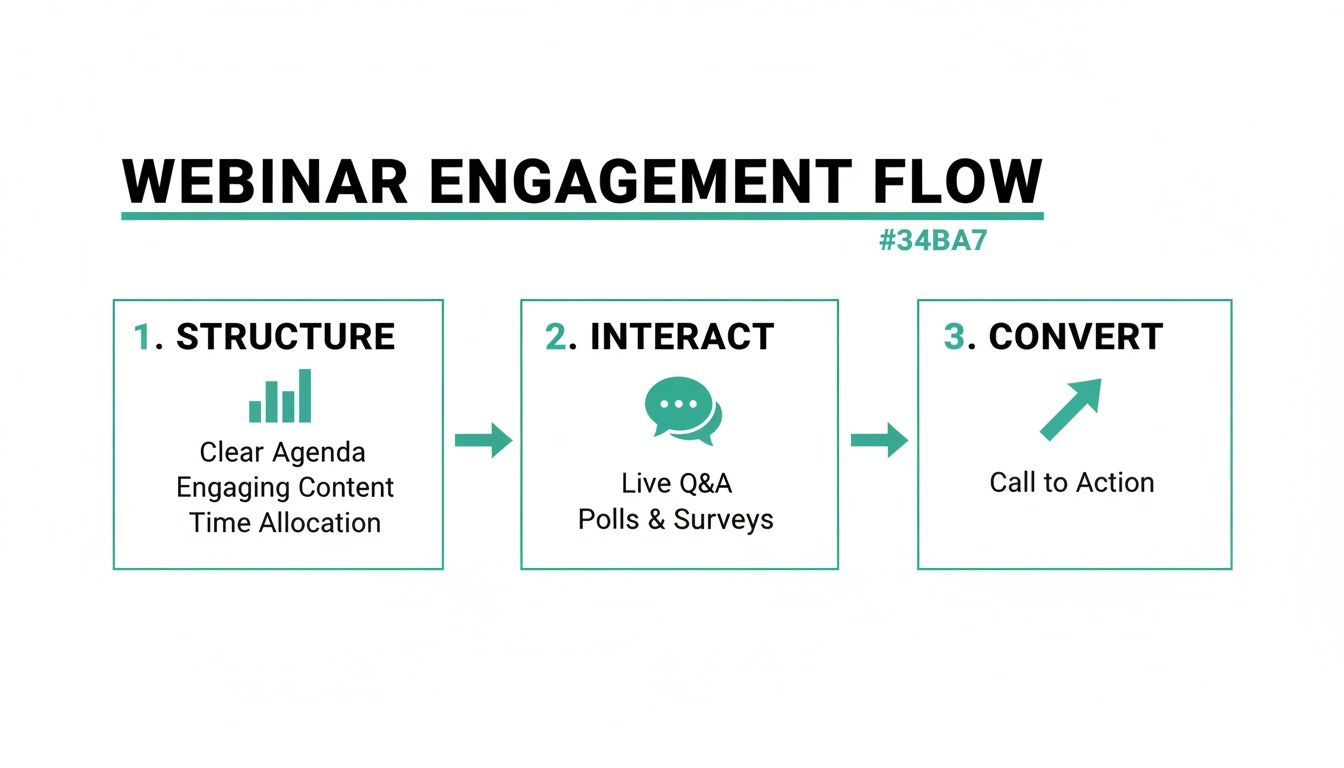
The key insight here is that a well-planned live event directly feeds the creation of high-engagement assets, which in turn drive measurable conversions.
The ROI Case for Automated Repurposing
The efficiency gains are enormous. You’re not just saving time; you’re fundamentally changing your content economics. You get to eliminate multiple software subscriptions, reduce your dependency on freelancers or agencies, and free up your team to focus on strategy instead of tedious production tasks. For an in-depth guide, explore our complete webinar repurposing strategy.
This approach is becoming critical for UK B2B marketers. Webinars are a key focus for ROI maximisation, especially as other formats like short-form video currently dominate. A recent LocalIQ survey ranked webinars at 5.3% for highest current ROI, but with 29% of marketers planning to invest more in them this year, the potential is huge.
This makes sense when you realise that 73% of B2B marketers call webinars a top lead generation source. And with 40% of views happening on-demand, the real value is unlocked long after the live event. Turning those on-demand views into high-ROI assets like short video clips is precisely how you close that gap and capture the full potential of your investment.
The true measure of a webinar's success isn't just the number of live attendees. It's how many leads, conversations, and sales the repurposed assets generate in the weeks and months that follow.
By automating this process, you create a scalable system. Every single webinar you've ever run, past and present, becomes a renewable source of content. You’re building a content engine that works for you 24/7, reaching audiences on their preferred platforms with formats they love to consume. This is how you finally get off the content creation hamster wheel and start building a valuable asset library that consistently delivers results.
Measuring What Matters for Webinar ROI
If you can't measure your webinar's impact, you can't improve it. More importantly, you can't justify the investment. To truly maximise webinar ROI, you have to look past surface-level stats like registration numbers and build a framework that draws a straight line from a piece of content to a closed deal.
This isn't about getting lost in complicated spreadsheets. It's about pinpointing the data that actually matters and using simple tools to connect your webinar activities—including all those repurposed assets—directly to revenue.
This is how you build an unshakeable business case for your webinar programme. You stop talking about engagement and start talking about pipeline and profit, armed with hard data that stakeholders can't ignore.
Defining Your Core Post-Webinar KPIs
Your post-webinar analytics need to tell a clear story about your content's performance and its influence on your audience. Forget drowning in data; focus on the key performance indicators (KPIs) that directly signal business impact.
We can split these metrics into two buckets: content engagement and business impact.
First, let's look at the essential engagement metrics:
- On-Demand View Count and Watch Time: It’s not just about how many people watch the replay, but for how long. A high watch time on specific clips is a massive clue about which topics are hitting home with your audience.
- Content Download Rate: Did you offer a resource like a PDF guide or a template alongside a repurposed blog post? The download rate is a powerful indicator of high-intent interest.
- Social Media Engagement: Keep a close eye on shares, comments, and click-through rates for your video clips and quote graphics. This is your measure for the reach and relevance of your repurposed content.
Once you have a handle on engagement, you have to connect it to tangible business results.
Tracking likes and views is easy, but attributing revenue is what gets you more budget. The ultimate goal is to prove that a specific video clip or blog post sourced from your webinar directly influenced a sales opportunity.
This is where you graduate from basic content metrics to ROI-driven analytics.
Connecting Repurposed Assets to Revenue
This is the crucial step that most marketers miss. You need a system that tracks a prospect’s journey from the moment they first engage with a repurposed asset all the way to becoming a customer. Thankfully, this isn't as complicated as it sounds.
Your two most powerful tools for this are UTM parameters and CRM integration.
Think of a UTM parameter as a digital breadcrumb. By adding a unique tag to the links for each repurposed asset, you can see exactly which blog post, social video, or email link brought someone to your site. For instance, you could create a specific UTM for a LinkedIn video clip that tells you it came from your "Q3_Product_Launch_Webinar".
Now, when that lead fills out a demo request form, their UTM source data is captured and sent straight into your CRM. Your sales team can immediately see that this new opportunity started with a specific piece of repurposed webinar content. You’ve just connected the dots.
In the UK B2B marketing space, this level of tracking is becoming essential. For 2025, webinars are one of the most effective channels, with 51% of marketing professionals ranking them just behind in-person events in terms of effectiveness. This highlights why B2B teams aren't just hosting webinars but are laser-focused on maximising ROI through smart repurposing.
And it makes sense when you consider that 40% of total views occur on-demand. Your webinar's value doesn't end when the live session does, and measuring this long-tail impact is critical, as you can learn from detailed video in business benchmarks.
By combining UTMs with your CRM, you build a clear, data-backed picture of which assets are driving qualified leads and influencing sales. This empowers you to double down on what works and cut what doesn't, continuously optimising your strategy to maximise webinar ROI with precision.
From Strategy to Execution: Your Next Steps
Reading about how to squeeze every drop of value from your webinars is one thing; actually doing it is another beast entirely. This guide has laid out the roadmap, showing that the secret isn't about working harder—it's about working smarter with the right tech to unlock the gold hidden in your recordings.
Let's be honest, the manual grind of repurposing content is what holds most marketing teams back. It’s slow, expensive, and frankly, a bit soul-crushing.
It’s time to break that cycle. Instead of wrestling with a dozen different tools, hiring freelancers for every little task, or just letting your best content gather digital dust, you can shift to a faster, automated workflow. The most practical next step? See it in action for yourself, with zero risk.
Turn all this theory into tangible results. See how a platform like RepurposeMyWebinar can take one 60-minute recording and spin it into 30 days of high-performing content that keeps working for you long after the live event ends.
The best way to grasp the impact of automated repurposing is to try it. Seriously, just upload one of your past webinars, pick the assets you want—like video clips, quote cards, or audiograms—and watch as the platform generates professional, on-brand content in minutes, not days.
Ready to nail down what happens after the event is over? Dive deeper into building a powerful post-webinar strategy with our guide on what to do after hosting a webinar.
Your Questions Answered: Maximising Webinar ROI
We get it—you need practical answers that tie directly to results. Here are the most common questions we hear from marketers who are serious about getting more from their webinars.
How Long Does It Really Take to Repurpose a One-Hour Webinar?
If you're doing it manually, you’re looking at a serious time sink. A dedicated team member can easily spend 8-10 hours painstakingly editing video clips, designing social graphics, and writing all the copy. It's a grind.
With an AI-powered platform like RepurposeMyWebinar, that entire workflow gets crushed down to just 5-10 minutes. You just upload your recording, tell it which assets you need—like short video clips, a blog post, or quote images—and the platform generates everything, fully branded. That massive time saving is a direct boost to your ROI.
What Kind of ROI Can I Realistically Expect from Repurposing?
The return on your investment comes from a few different angles. First off, you’re slashing the cost of creating each new piece of content. Instead of starting from scratch every time, you’re mining a resource you already own.
Next, you get to expand your lead generation efforts by reaching different audiences on their preferred channels. Think about the people who’d rather watch a 60-second video clip than read a blog post, or vice versa. Repurposing lets you capture both. And finally, you’ll improve your SEO with fresh blog content spun directly from your expert conversation.
While the exact numbers vary, we often see clients achieve a 3-5x increase in the lead-generating lifespan of their webinar content. They also see a huge drop in content production costs, which makes the entire marketing budget work a lot harder.
My Webinars Are Very Technical—Can AI Really Create Accurate Content?
Absolutely. Modern AI has come a long way and is now incredibly good at understanding and transcribing technical, niche-specific language.
Platforms like RepurposeMyWebinar use advanced AI to create highly accurate transcripts. Those transcripts then become the foundation for SEO-friendly blog articles, precise quote cards, and insightful social media posts. The system is smart enough to identify the key themes and most powerful statements, ensuring the repurposed content maintains the authority and accuracy of your original presentation.
You still get the final say, of course. You can quickly review and approve everything before it goes live, but all the heavy lifting is done for you.
Stop the manual grind and start maximising your webinar ROI today. With RepurposeMyWebinar, you can turn a single one-hour recording into a full month of ready-to-publish content in just a few minutes.