Repurpose Live Webinar Recording and Get a Month of Content in Minutes
Learn how to repurpose live webinar recording into 30 days of high-impact content. A practical guide for B2B marketers to automate and scale content creation.
What does it really mean to repurpose a live webinar recording? It means taking that single, expensive one-hour event and automatically transforming it into a complete content library. Think short video clips for social media, SEO-optimised blog posts, and shareable image quotes. It’s the smartest way to turn one webinar into 30 days of high-impact marketing content, maximising the ROI on your initial investment.
Unlock the Hidden ROI in Your Webinar Recordings
Your company doesn't run webinars for fun. Every single one costs thousands of US dollars. You have speaker fees, ad spend to drive registrations, and the cost of your team's time—it all adds up to a significant investment. But what happens after you click "End Webinar"?
Too often, that valuable, expert-led recording is left to gather digital dust. It becomes a massively underutilised asset, which is a direct hit to your ROI.
This is a painful reality for B2B marketing teams. You execute a fantastic live event, the engagement is high, and then… the momentum vanishes. The immense potential of that recording stays locked away. This isn't just a missed opportunity; it’s a waste of your budget.
The True Cost of Manual Repurposing: Time, Money, and Headaches
The old-school way to repurpose live webinar recordings is a nightmare. It means tasking someone with manually scrubbing through an hour-long video to find the best moments. Then, they have to juggle multiple, disconnected software tools for video editing, graphic design, and transcription. It’s a coordination headache that results in a few basic assets, weeks later.
This friction is the real killer. You know there's gold in that recording, but you simply don't have the time, team, or tools to mine it efficiently. This bottleneck stops you from publishing enough content to stay top-of-mind with your audience.
Webinars have cemented their place as a lead generation powerhouse. Recent benchmark reports show that B2B webinars deliver an impressive average 213% ROI, with a cost-per-lead of just US$72—a fraction of other channels.
That number alone highlights the immense value you’re leaving on the table. With average webinar attendance hitting 216 participants, the potential audience for your repurposed content is huge.
The solution isn't hiring more people or buying more complex tools. It's about fundamentally changing your workflow. Imagine an AI-powered platform that automatically turns your 60-minute recording into a complete, ready-to-publish content calendar. This is where you stop the manual grind. You save an incredible amount of time while multiplying the value of every webinar you host. If you've been wondering what to do after hosting a webinar, the answer starts with an efficient, automated repurposing strategy. And that's exactly what RepurposeMyWebinar was built for—to eliminate the manual work and turn your expensive, time-consuming problem into a streamlined content engine.
Your Automated Webinar Repurposing Workflow
Let's move past theory and into a practical system that squeezes every drop of value from your webinars. This isn’t about adding more tasks to your plate—it’s about removing them. The entire goal is to take a single 60-minute recording and turn it into a full month of marketing content, all from one file upload.
Forget wrestling with a dozen different tools, hiring freelance editors, or begging your design team for help. This workflow is simple: take your raw recording from Zoom or Microsoft Teams and drop it into an intelligent platform. That’s it. The manual work stops here.
From that single upload, our AI gets to work, generating a highly accurate transcript. But it doesn't just stop there; it also identifies who was speaking and when. This makes it incredibly simple to pull out quotes from your main presenter, a guest expert, or even a brilliant question from the Q&A session.
From Raw Recording to Ready-To-Use Assets
The real game-changer is how this process automatically flags the best moments in your webinar. Our system hunts down key insights, audience questions, and the most shareable soundbites. Instead of you spending hours scrubbing through the timeline, the gold is served up on a platter, ready for your approval.
This is where you step in, but without any of the tedious work. You can quickly review the AI-suggested snippets and select what you need.
- Short Video Clips: Instantly created to grab attention on social media.
- Audiograms: Ideal for sharing powerful audio moments on platforms like LinkedIn.
- Image Quotes: Brilliant for creating visual, shareable graphics that stand out.
- Text-Based Posts: Ready-made copy for LinkedIn and X (formerly Twitter).
The entire system is built for speed and simplicity. If you want to see exactly how this works in practice, we've got a more detailed guide on how to automate webinar repurposing that breaks it all down.
This diagram shows the journey from a costly, forgotten recording to a content engine that drives ROI.
It’s all about a shift in mindset: a webinar isn't a one-off expense. It's a renewable source of high-performing content.
A Real-World SaaS Demo Scenario
Let’s make this concrete. Imagine you’ve just finished a 60-minute webinar demonstrating your SaaS product. It went great—valuable insights, fantastic questions, the lot.
In the old days, that recording might get sent in a follow-up email before being forgotten. With RepurposeMyWebinar, the story is completely different.
In less than ten minutes, you can turn that one-hour recording into a whole campaign's worth of marketing assets. By uploading the file, you can instantly generate:
- Eight polished video clips: Highlighting key product features and benefits, perfect for social ads or organic posts.
- Twelve impactful image quotes: Capturing key stats and customer pain points you discussed.
- One SEO-optimised blog article: A well-structured summary of the webinar's main themes, ready to attract organic traffic.
- Four LinkedIn-style text posts: Designed to spark conversation and drive traffic back to your site.
The secret sauce is brand consistency. Every single asset is automatically created with your pre-set Brand Kit—your logo, brand colours, and fonts are applied instantly. No designer, video editor, or multiple tools needed.
This isn't just about making content faster. It's about building a consistent, professional presence across all your channels without the usual cost and complexity. You’ve already invested thousands in the webinar; this workflow ensures you maximise its ROI, turning it into a reliable pipeline of high-quality content that works for you long after the live event ends. You get professional results, save a ton of time, and finally prove the value of your webinar programme.
Create High-Impact Video and Audio Assets Instantly
Let's be direct: video production is a massive bottleneck. It consumes time and money that you don't have. After pouring your energy into a live webinar, you're left with an hour of brilliant footage but no simple way to extract the best moments. Manually scrubbing through a recording to find shareable clips is a soul-destroying task.
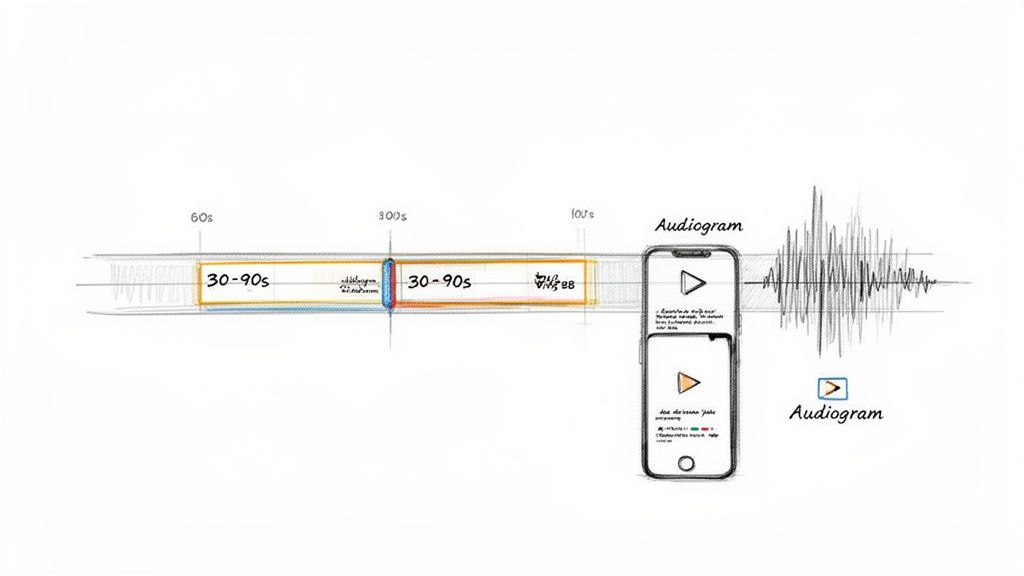
This is where our AI completely changes the game. Instead of you doing the heavy lifting, our intelligent system analyses your entire recording in minutes, pinpointing the most compelling 30-90 second segments. These are the golden nuggets—perfect for Instagram Reels, YouTube Shorts, and LinkedIn. These are the moments that grab attention and deliver a powerful message, fast.
The process is built for speed. You review the clips our AI suggests, approve the ones you like, and the platform handles the rest. It automatically adds your logo, applies your brand colours, and burns in eye-catching animated captions. What used to take a video editor hours now takes a few clicks. For a deeper dive, check out our guide on using a webinar clip generator.
Beyond Video Clips Into Engaging Audiograms
Not every powerful moment is visual. For this, creating audiograms is an incredibly smart way to repurpose your live webinar recording.
Audiograms are short audio snippets overlaid on a branded image with an animated soundwave. They’re perfect for sharing on platforms where people might be scrolling without sound or simply prefer listening. It's a brilliant way to capture the attention of podcast listeners and anyone consuming content on the go.
RepurposeMyWebinar makes this as simple as creating video clips. The platform identifies powerful audio-only moments, letting you turn them into branded, shareable assets without ever touching complex audio editing software. This opens up a new channel for your content, reaching audiences you might have otherwise missed.
The real win here is generating a steady stream of professional-quality video and audio content at scale. A single 60-minute webinar can easily give you 6-16 distinct video clips and audiograms, filling your content calendar for weeks.
Maximising Reach and Engagement
Timing and follow-through are everything. Being able to repurpose live webinar recordings is what turns a fleeting moment into a lasting marketing asset. Knowing that Wednesday webinars get the highest attendance at 48% helps you plan, but what you do after is what really counts. By transforming that webinar into short-form videos—a format 46% of UK marketers are prioritising—you multiply its impact massively.
A great strategy here is to learn how to transform 10-minute tutorials into 10-second teasers for platforms like YouTube Shorts. The same principle applies directly to your webinar footage.
For B2B marketing managers and digital agencies, this automated workflow is a huge competitive advantage. You can stop hiring freelance video editors or juggling multiple tools, saving thousands in production costs. More importantly, you get your time back. Your team can focus on strategy and distribution instead of being bogged down in manual production work.
Turn Spoken Insights Into High-Ranking Written Content
Video and audio are essential, but nothing beats the authority and SEO power of well-written content. Your webinars are already packed with expert insights—they are essentially pre-written blog posts and social updates waiting to be unlocked. The problem has always been the manual effort of transcribing, structuring, and writing it all from scratch.
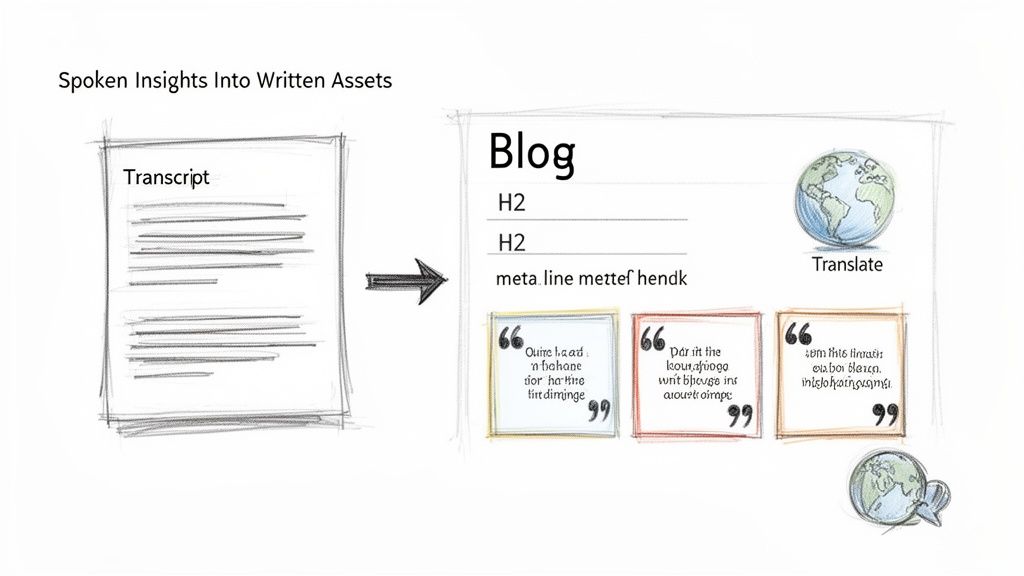
Instead of staring at a blank page, you can now instantly convert your spoken expertise into articles that rank. The first step is an accurate transcript. Knowing how to transcribe video to text is crucial, and with a tool like RepurposeMyWebinar, this happens automatically, giving you the raw material for a full suite of written assets in minutes.
From Transcript to SEO-Friendly Blog Post
An accurate transcript is the blueprint for an authoritative blog post. Imagine taking the key themes from your webinar and, with a single click, generating a fully structured article complete with SEO-optimised H2 and H3 headings. This isn't just copy-pasting dialogue. It’s an intelligent transformation of a conversation into a well-organised, readable format that search engines love.
Our system analyses your webinar's core topics to draft a compelling meta description and title, giving you a massive head start. You're no longer pulling content ideas out of thin air. Instead, you're publishing proven, audience-validated material that has already resonated with a live audience, dramatically increasing its chances of ranking well.
Extract Powerful Quotes and Social Posts
Your webinar is filled with impactful, shareable one-liners. Sifting through an hour of footage to find these is tedious, but our AI-powered platform instantly pinpoints the most powerful quotes.
With RepurposeMyWebinar, you can effortlessly pull 6-16 compelling image quotes and LinkedIn-style text posts from a single one-hour session.
These aren't random sentences. The system is trained to spot insightful statistics, strong opinions, and memorable takeaways perfect for social media. Each quote is then automatically placed into a branded template, ready to share. This creates a steady stream of micro-content that drives engagement and points people back to your bigger assets, like the full recording or the new blog post.
Go Global With Instant Content Translation
Why limit your expertise to one market? A huge but often overlooked strategy when you repurpose a live webinar recording is translation. Your content has global appeal, but language barriers can stop its reach.
Forget hiring expensive translation services. Now, you can do it instantly. With the right tools, you can take your newly created blog post and social updates and translate them into over 30 languages. This simple step opens up entirely new markets, letting you build authority and generate leads in regions you previously couldn't touch. It’s a powerful way to scale your content strategy without scaling your budget.
This approach is critical when you consider that 73% of UK B2B marketers rank webinars as their top source for high-quality leads. While the live event is potent—with 20-40% of attendees becoming qualified opportunities—the fact that nearly 50% of total views come from on-demand recordings shows where the real scalable value is. One webinar can efficiently become a month’s worth of global content, all generated in minutes.
Build Your Content Distribution and Measurement Engine
Having a folder full of beautifully branded assets is a great start, but it's only half the battle. The real ROI comes when you get that content in front of the right people and can prove it’s working. This is where you connect a single recording to a healthier marketing pipeline.
Forget complex content calendars that nobody follows. Your distribution plan needs to be simple and sustainable. The aim is to create a steady drumbeat of value across your key channels, all without burning out your team.
You’ve already done the hard part—turning a one-hour session into a month's worth of content. Now, it’s time to put it to work.
A Simple Cross-Platform Scheduling Framework
Think of your distribution in weekly sprints. You're not just throwing random clips out there; you’re using different assets to tell a cohesive story and guide your audience.
Here’s a practical weekly schedule you can implement immediately:
- Monday: Publish the SEO-optimised blog post generated from the webinar. Share it across LinkedIn and X (formerly Twitter) for an initial traffic boost.
- Tuesday: Post a compelling video clip on LinkedIn and Instagram Reels. Use a caption that teases a key insight and links back to the full blog post.
- Wednesday: Share a different asset, like a striking image quote or an audiogram, to reinforce the week’s theme and keep things fresh.
- Thursday: Drop another short video clip, this time tackling a common customer pain point covered in the webinar.
- Friday: Wrap up the week with a LinkedIn-style text post. Ask a thoughtful question related to the webinar topic to start a conversation.
This simple rhythm ensures you're consistently visible across platforms without creating a single new piece of content. It’s all powered by the assets you created in minutes.
The most effective distribution isn't about sheer volume; it's about strategic placement. By mixing up your formats—video, text, and images—you cater to different audience habits and platform algorithms, squeezing every drop of value out of your webinar.
Measuring What Actually Matters for ROI
Likes and shares are nice, but they don't pay the bills. To prove the ROI of your efforts to repurpose a live webinar recording, you need to track metrics that tie directly to business goals. It's time to move beyond vanity metrics and focus on what drives growth.
Your measurement should focus on a few key areas that show clear value. This isn't about getting lost in spreadsheets; it's about having a clear line of sight into what's working so you can do more of it.
Key Metrics to Track for Repurposed Assets
To understand the real impact, concentrate your analysis on these specific performance indicators. They paint a much clearer picture of how your content is contributing to the bottom line.
- Lead Generation from Assets: Use UTM parameters on every link you share. This is non-negotiable. It lets you track exactly how many demo requests or trial sign-ups came directly from a specific video clip or blog post.
- Engagement Rate on Key Platforms: Look past the likes. Are people commenting on your LinkedIn posts? Saving your Instagram Reels? This deeper engagement is a strong signal that your content is genuinely resonating.
- Website Traffic and Time on Page: See how many visitors the SEO blog post is bringing to your site from organic search. More importantly, check the 'time on page' metric in Google Analytics. A high number means people are actually reading and absorbing your expert content.
- Conversion Rate of On-Demand Webinar: For anyone who clicks through to watch the full recording, what percentage of them take that next step? This tells you how effective the full-length webinar is as a conversion tool.
By focusing on these metrics, you change the conversation from "we posted some clips" to "our repurposed webinar content generated 25 new leads and influenced US$15,000 in our pipeline this month."
This entire process, from asset creation to distribution and measurement, is exactly what RepurposeMyWebinar was built to do. It frees your team from the manual production work so they can focus on what matters: strategy, analysis, and growth. You stop just making content and start building a predictable engine for growth, powered by expertise you already have.
Your Webinar Repurposing Questions, Answered
Even with the most streamlined workflow, you’re bound to have questions. Let's tackle the most common ones we hear from B2B marketing teams.
How Long Does It Really Take to Repurpose a One-Hour Webinar?
This is always the first question. The answer highlights the difference between the old manual way and using smart automation. Manually, you’re looking at days, even weeks, of coordinating with editors, designers, and copywriters.
With an AI platform like RepurposeMyWebinar, the timeline shrinks dramatically. The initial heavy lifting—transcription, speaker identification, and flagging key moments—is done in about 10-15 minutes. After that, generating your clips, blog posts, and quote graphics is a matter of a few clicks.
The entire process, from uploading your recording to having a month's worth of content ready to go, can be completed in under 30 minutes.
What Kind of Video Files Can I Use?
Nothing kills momentum faster than file conversion errors. A smooth workflow means you shouldn't have to think about file types.
RepurposeMyWebinar is built to handle the video formats you already use. You can take your recording straight from Zoom, Microsoft Teams, or Google Meet and upload it directly.
- MP4
- MOV
- AVI
The goal is to make it seamless when you repurpose a live webinar recording. Finish the event, download the file, and drop it straight into the platform. It's that simple.
The whole point is to remove any technical roadblocks. Finish your webinar, download the recording, and upload it. It should be that simple.
Can I Make Sure All the Assets Match My Company's Branding?
Absolutely. Brand consistency is non-negotiable, and it’s a standard feature in our platform. Manually adding logos and brand colours to dozens of assets is tedious and prone to error.
RepurposeMyWebinar solves this with a 'Brand Kit'. You set it up once by uploading your logo, adding your brand colour hex codes, and selecting your corporate fonts.
From that moment on, every single asset the tool generates is automatically branded. Your video clips get the right captions and colours, your image quotes have the right look and feel, and everything is perfectly consistent. No design software or designer needed.
Does This Work for Really Technical or Niche Webinars?
Yes, and this is where repurposing truly shines. Webinars packed with dense, technical information can be overwhelming for an audience to digest in one sitting.
Our AI is particularly good at spotting key terminology, complex audience questions, and the deep expert insights that your specialised audience craves. By breaking down a heavy, hour-long discussion into bite-sized clips, quotes, and articles, you make your expertise far more accessible. You're not just reusing content; you're making your most valuable knowledge easier to find and share within your target industry, cementing your position as an authority.
Ready to stop your best content from gathering digital dust? With RepurposeMyWebinar, you can turn one 60-minute webinar into 30 days of content. Ditch the manual slog, eliminate the need for multiple tools and freelancers, and finally see a real return on your webinar investment.
See how it works and start your free trial at RepurposeMyWebinar.com.