How to Extract Quotes from a Webinar and Maximise Your ROI
Learn how to extract quotes from webinar recordings to create a month of content. Our guide covers an AI workflow that saves time and boosts your marketing ROI.
You’ve invested thousands of dollars and weeks of effort into your webinar. Don't let that value die the second the live event ends. The key to maximising your return is a fast, simple process for turning expert insights into high-impact, shareable content. It’s about taking that recording, effortlessly finding the best quotes, and instantly packaging them into on-brand graphics for social media, blogs, and emails. The goal isn't just to do it, but to do it with maximum efficiency—pulling 6-16 image quotes from a single webinar without drowning in manual work.
Your Webinars Are an Untapped Content Goldmine
Let's be direct: producing a webinar is expensive and time-consuming. For marketers under constant pressure to deliver fresh content, letting that valuable recording gather digital dust is a massive missed opportunity and a poor return on investment.
Every webinar you host is packed with expert knowledge, compelling data, and authentic quotes just waiting to be repurposed. Instead of getting back on the content treadmill, you can transform a single 60-minute webinar into 30 days of high-performing social media content. This is how you build a powerful content engine that saves time, cuts costs, and proves the ROI of your marketing spend.
Maximise Your Content Investment
You have to think beyond the live broadcast. A smart webinar repurposing strategy amplifies your message and reaches new audiences long after the event is over. The trick is to see each recording not as a single piece of content, but as the raw material for dozens of smaller, bite-sized assets.
Just look at the potential return on your investment (ROI):
- Generate dozens of assets: A single hour-long webinar can easily yield 6-16 shareable image quotes, multiple LinkedIn posts, and several blog snippets.
- Extend your content’s lifespan: You can turn a one-time event into evergreen content that keeps driving engagement and leads for months.
- Eliminate manual work: Stop starting from scratch. Reusing what you've already created dramatically cuts down on content creation time, freeing your team for strategic work that drives revenue.
The core idea is simple: get off the content treadmill. Instead of constantly churning out new material, focus on maximising the value of your biggest investments—your webinars.
Why This Matters for B2B Marketers
Webinars are a cornerstone of B2B marketing for a reason: they work. But with 63% of views coming from on-demand replays, the real value lies in what you do after the live event. An efficient process to extract quotes isn't a "nice-to-have"; it's essential for making your content work smarter and harder.
A well-executed plan means you can stop juggling multiple tools or hiring expensive freelancers. RepurposeMyWebinar provides a single, automated solution that handles everything from transcription to professional design. It eliminates the manual work, multiple subscriptions, and hiring needs, making the entire process fast, simple, and incredibly effective.
The Old Way vs. The New AI-Powered Workflow
For years, pulling quotes from a webinar has been a painfully manual slog. It's a workflow that drains time, your budget, and creative energy, which is why countless hours of valuable webinar recordings sit on a server, gathering digital dust. All that potential ROI, locked away because the process is broken.
The old way starts with someone on your team (or an expensive freelancer) re-watching the entire hour-long recording. They painstakingly scrub through the footage, trying to pinpoint impactful moments while manually typing out potential quotes. That one step alone can eat up hours of tedious work.
From there, they have to juggle a suite of tools. The transcribed text goes into one document, timestamps into a spreadsheet, and then it’s handed off to a designer to wrestle with a platform like Canva. Another team member tries to create on-brand graphics, often leading to inconsistent results that weaken your brand identity. Finally, someone has to manually upload all these assets to a scheduling tool. It’s a mess.
The hidden cost here is staggering. It’s not just the freelancer’s invoice for a few hundred US dollars; it’s the 10-15 hours of your team’s time per webinar that could have been spent on strategy, not mind-numbing production work.
The Problem with Manual Extraction
This traditional method is fundamentally broken for any team that wants to scale its content marketing. It creates bottlenecks, drives up costs, and ultimately delivers a poor return on the massive investment you already made in the webinar.
Here’s a look at the manual struggle:
- It's incredibly time-consuming: Hours are lost just watching, transcribing, and jotting down timestamps.
- It gets expensive, fast: You're either paying for freelancers or pulling your team away from tasks that actually move the needle.
- You're drowning in tools: Juggling transcription services, design software, and social schedulers is inefficient and invites errors.
- Branding is inconsistent: Without a central system, keeping dozens of quote graphics looking cohesive is a nearly impossible task.
This fragmented workflow means that a 60-minute webinar, which costs thousands to produce, becomes a content burden rather than a content goldmine. The effort is so high that most teams just give up, leaving valuable insights unheard.
A Faster, Smarter Approach
Now, contrast that headache with a modern, AI-powered workflow. Instead of a multi-day, multi-tool nightmare, the entire process is condensed into minutes, all inside a single platform.
With a tool like RepurposeMyWebinar, you just upload your recording. That’s it.
The AI gets to work instantly, generating a full, accurate transcript. But here’s the magic: it also analyses the entire conversation and automatically pinpoints the most compelling, shareable quotes for you. No more manual scrubbing or guesswork. And if you want more fine-tuned control, an AI-powered webinar clip generator can help you isolate specific moments with ease.
In about 10 minutes, you can have a complete set of 6-16 professionally designed, on-brand image quotes ready to publish. The system applies your pre-set Brand Kit—logos, colours, and fonts—to every asset, ensuring perfect consistency without you lifting a finger. This isn't just an improvement; it's a complete reinvention of the process that eliminates manual labour, multiple software subscriptions, and costly outsourcing.
Manual Extraction vs. AI-Powered Automation
| Task | Manual Method (The Old Way) | AI Automation (The New Way) |
|---|---|---|
| Transcription | Hours of manual typing or paying for a separate service. | Automatic, highly accurate transcript generated in minutes. |
| Quote Identification | Manually scrubbing through an hour-long video to find good soundbites. | AI analyses the conversation and suggests the most impactful quotes. |
| Design | A designer manually creates each image one by one in Canva or Photoshop. | Branded templates are applied automatically for perfect consistency. |
| Time Investment | 10-15 hours per webinar, involving multiple team members. | Around 10-15 minutes for one person to review and approve. |
| Total Cost | $200-$500+ per webinar (freelancers + software subscriptions). | Included in a single platform subscription, for a fraction of the cost. |
| Tools Required | Transcription service, Google Docs, spreadsheet, design software, scheduler. | A single, all-in-one platform like RepurposeMyWebinar. |
As the table shows, the new way isn’t just faster—it’s more efficient, cost-effective, and scalable. It transforms a major content bottleneck into a seamless part of your marketing engine, finally letting you unlock the true ROI sitting inside your webinar recordings.
Your Automated Workflow for Quote Extraction
Forget the old way of doing things—manual transcription, endless back-and-forths with designers, and a content calendar that’s always half-empty. The modern approach to pulling quotes from a webinar is fast, refreshingly simple, and requires zero technical skill. It’s a single, cohesive workflow designed to turn those expensive webinar recordings into a steady stream of high-quality assets in minutes, not days.
The whole process kicks off with your recording. All you have to do is upload the video file—whether it’s from Zoom, Microsoft Teams, or another platform—into a tool like RepurposeMyWebinar. Seriously, that’s the only manual step you need to take.
Once it's uploaded, the AI takes over. You just tell it you want “Image Quotes,” and the system gets to work, automatically transcribing the entire session with high accuracy. More importantly, it analyses the dialogue to pinpoint the most impactful and articulate soundbites, handing you a ready-made list of suggested quotes.
Customise and Perfect Your Quotes
With a list of AI-suggested quotes waiting for you, the heavy lifting is done. Now, you can apply your company’s unique branding with a single click. Your pre-configured Brand Kit—loaded with your logos, brand colours, and specific fonts—is instantly applied to every single quote image.
This one click ensures every asset is perfectly on-brand, creating a cohesive and professional look across all your channels. No need to open another design tool or double-check a style guide; the consistency is baked right into the workflow.
You also have full control to polish the text itself. While the AI is great at identifying killer quotes, you can easily:
- Trim the text for more punch, making it perfect for fast-scrolling social media feeds.
- Adjust the wording for compliance or clarity, ensuring the final message lands exactly as you intended.
- Swap out quotes if you spot a different soundbite that better aligns with your current campaign goals.
This infographic really drives home the difference between the old, soul-crushing manual process and this new automated approach.
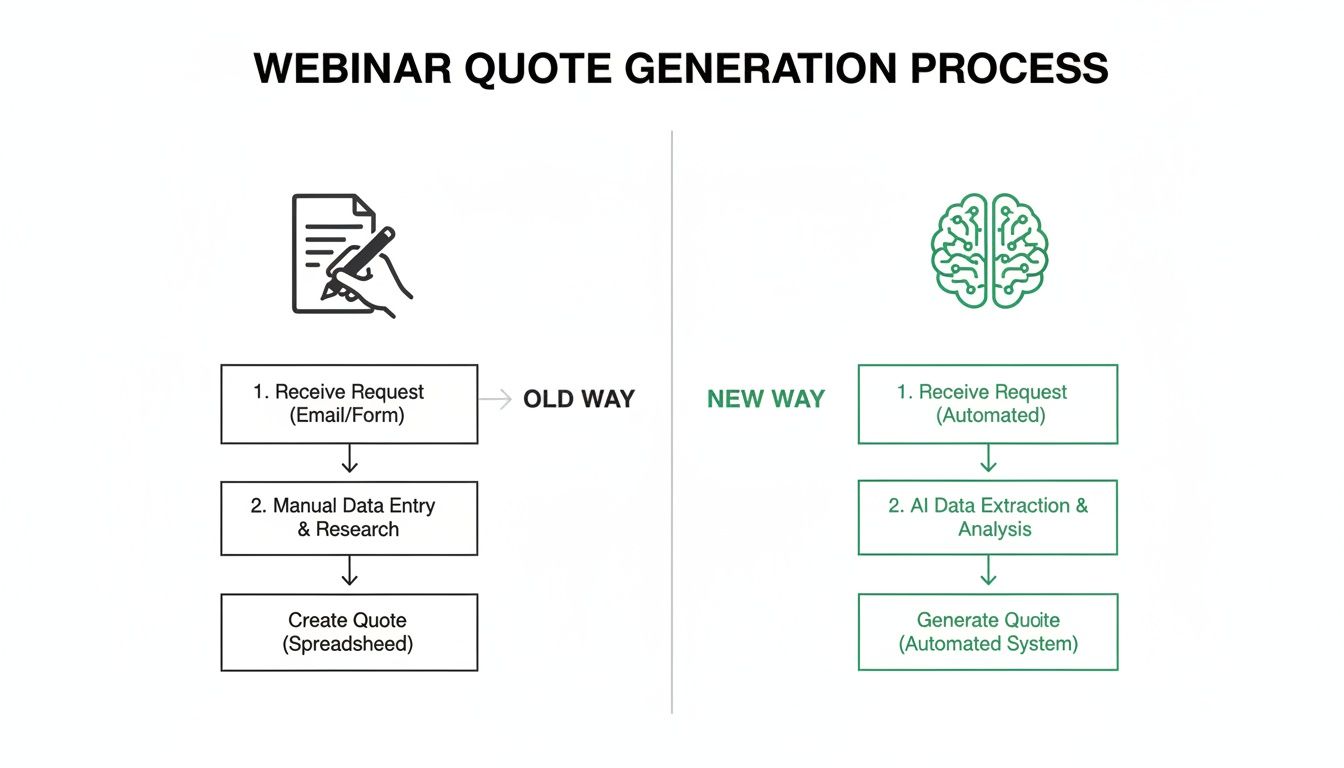
The picture it paints is clear: automation collapses a messy, multi-day process into a few simple clicks inside one platform.
Export and Deploy in Minutes
The final step is getting your finished assets out into the world. The entire process, from uploading a 60-minute webinar to having a complete set of polished, on-brand image quotes, can be done in under 10 minutes. This isn't just about saving time; it's a strategic advantage that lets you react quickly to market trends and keep your content calendar consistently full.
You can download the quote images one by one or as a complete, organised package. The files are ready for immediate scheduling on platforms like LinkedIn and X, or for dropping into your next blog post or email newsletter.
The real win here is the elimination of friction. You no longer need separate tools for transcription, design, and project management. You don’t need to coordinate with freelancers or bog down your in-house team with tedious, repetitive work.
This streamlined workflow completely changes how you extract quotes from a webinar, turning what was once a costly bottleneck into a reliable content engine. It’s all about maximising the ROI of your webinars by making the repurposing process so simple and fast that it becomes an effortless, almost invisible part of your marketing routine.
How to Pinpoint and Polish the Perfect Quotes
Having an AI pull potential quotes is a massive time-saver, but a human eye is essential for spotting the soundbites that will actually stop someone mid-scroll. Not every interesting point from an hour-long webinar translates well to a crowded social feed. What sounds profound in context can feel completely flat on its own.
Your job is to identify the gems. Your AI tool serves up the candidates, but your strategic eye is what turns a decent quote into a truly magnetic piece of content. You’re hunting for those standalone statements that pack a serious punch and deliver immediate value.
What Makes a Quote Shareable?
As you review the AI's suggestions, imagine you’re scrolling through LinkedIn on your phone. What would make you pause? You're looking for quotes that are instantly understandable and hit an emotional or intellectual chord.
The most high-impact soundbites usually fall into one of these four categories:
- Provocative Statements: Look for bold claims or contrarian takes. Anything that challenges the status quo is pure gold for sparking conversation.
- Surprising Statistics: A shocking number is hard to ignore. A line like, "It turns out 78% of teams are still using spreadsheets for a process that can be automated," is immediately compelling.
- Actionable Tips: People crave practical advice. A quote that offers a clean, concise tip or a "how-to" insight gives your audience immediate value they can apply to their work.
- Memorable One-Liners: Sometimes, it’s just a simple, powerful idea phrased perfectly. These are the quotes that are easy to remember, feel aspirational, and get screen-shotted.
A good quote explains an idea. A great quote makes you feel something—curiosity, surprise, or the urgency to act. That's the difference between a quote that gets seen and a quote that gets shared.
Polishing Your Quotes for Maximum Impact
Once you've cherry-picked your best contenders, a little editing can make a huge difference. The goal isn't to change the speaker's meaning but to sharpen its delivery for a text-based format. You’re optimising for clarity and brevity.
This is where you trim the fat. Cut out filler words—the "ums," "ahs," and conversational fluff that get in the way. Your aim is to condense sentences until the core message is as direct as possible.
For instance, a speaker might say: "So, what we've found, you know, is that when you really look at the data, it seems that a lot of companies are, for the most part, struggling with their content ROI."
With a quick polish, you can turn that into something much stronger: "Our data shows most companies are struggling with content ROI."
See the difference? The edit keeps the original intent intact but delivers it with far more authority and punch. One critical rule: never edit a quote in a way that misrepresents what the speaker meant. Your job is to amplify their expertise, not put words in their mouth. By combining smart selection with sharp editing, you can reliably extract quotes from a webinar that drive real engagement.
Designing On-Brand Graphics That Stop the Scroll
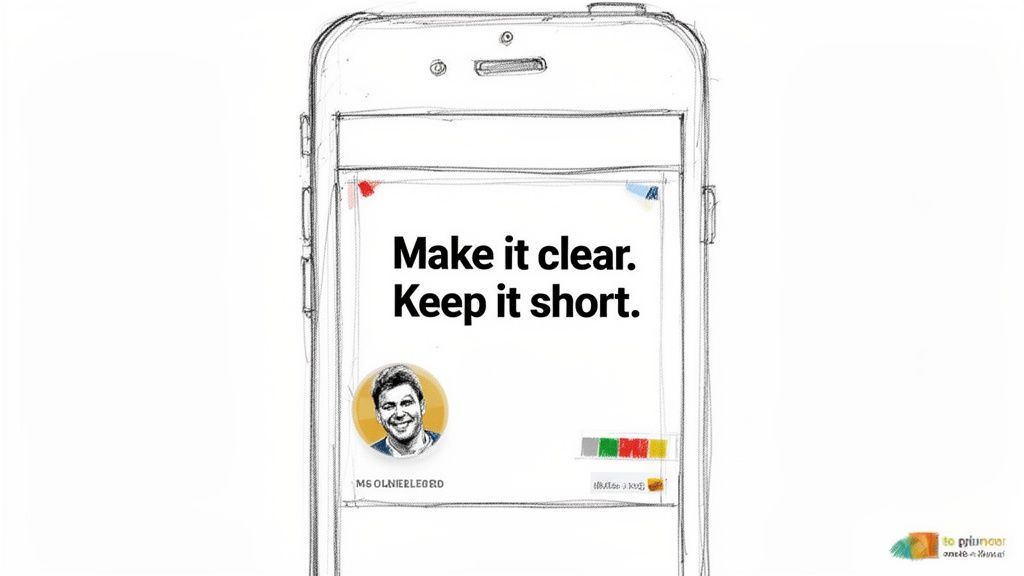
A powerful quote can easily vanish in a crowded social feed if its design is weak. Even the most insightful soundbite will get scrolled past if it’s wrapped in an unprofessional or inconsistent graphic. This is where brand consistency becomes a non-negotiable part of the strategy to extract quotes from a webinar.
When someone in your audience sees a quote graphic, they should instantly know it’s yours. That immediate recognition comes from the consistent use of your company’s logos, fonts, and colours, which builds brand recall and, more importantly, trust. Every asset you publish is another touchpoint, reinforcing your brand’s identity and authority.
But achieving this consistency manually is a nightmare. It means a designer has to create each graphic one by one, constantly double-checking a brand style guide. That process is slow, expensive, and full of errors, which is why automation is the only way to do this at scale.
Your Brand Kit as a Single Source of Truth
This is exactly the friction a platform like RepurposeMyWebinar is built to eliminate. It solves the design headache with a pre-configured Brand Kit. You just upload your assets—logo, fonts, and colour palette—one time.
From that point on, the system becomes your automated brand guardian. Every quote graphic it generates will automatically have your branding applied perfectly. No designer needed, and you definitely don’t need another piece of software. It’s just done.
The key takeaway is this: you can produce dozens of perfectly branded, professional-looking quote images without any design skills. This allows you to focus on the quality of the content, not the tedious mechanics of production.
Adapting Designs for Different Platforms
Different social media platforms demand different visual styles. A clean, professional layout works wonders on LinkedIn, while a more vibrant, eye-catching design might perform better on Instagram or X.
A smart platform will give you a library of templates already optimised for these channels. This lets you:
- Choose professional layouts for LinkedIn that incorporate speaker headshots to add a human, authoritative touch.
- Select dynamic templates for Instagram that use high-contrast colours and bold typography to grab attention.
- Ensure legibility on all devices with designs that prioritise clear, easy-to-read text, even on small mobile screens.
This level of automation means you can spin up a diverse set of visuals from a single quote, tailoring each one to the platform where it will live. If you're hunting for more ideas, you can learn more about how to effectively turn a webinar into social media posts in our detailed guide. It all comes down to making sure your hard-won insights command attention and drive engagement, no matter where your audience finds them.
Frequently Asked Questions
Got questions before you jump in? Smart move. Here are the most common things B2B marketers ask when figuring out how to extract quotes from a webinar.
How many quotes can I get from one webinar?
Out of a standard 60-minute webinar, you can realistically pull anywhere from 6 to 16 fantastic, shareable quotes. A tool like RepurposeMyWebinar will likely flag even more possibilities, leaving you with plenty of great options. That’s more than enough to turn one webinar into 30 days of content.
What if speakers make mistakes or go off-topic?
This happens all the time, and it's exactly where an AI-assisted process shines. The AI is trained to pick out the clearest, most powerful moments in the conversation. It naturally skips over the ums, ahs, and rambling tangents.
Most importantly, you are always in control. You get the final say on every quote. You can easily tweak the text to clean up a sentence or polish the wording, ensuring the speaker's original intent stays perfectly intact.
Do I need design skills to create quote images?
Not at all. This is one of the biggest wins of automation. Forget about wrestling with design software or hiring freelancers.
With a dedicated platform, you set up your Brand Kit once by plugging in your logo, brand colours, and fonts. From then on, every quote graphic is automatically generated with your branding perfectly applied. No design degree required.
How long does this whole process take?
Doing this manually is a slog. We’re talking 10-15 hours of work spread across different team members and multiple tools.
With an AI-powered platform, it's a completely different story.
For a typical one-hour webinar, you can go from uploading the file to exporting a full batch of ready-to-post image quotes in under 10 minutes. That's it.
Ready to stop wasting time and start tapping into the goldmine sitting in your webinar recordings? RepurposeMyWebinar turns your webinars into a month of high-performing assets in minutes. Eliminate manual work and see just how easy it is to extract quotes from a webinar and build a content engine that actually scales. Start your free trial today.